
Data collection
Learn how to collect data for virtual asset transactions using Notabene components and API, including optional steps for counterparty discovery and Travel Rule validation.
Using the Notabene component
Notabene's SafeConnect Components are embeddable UI elements that help entities like VASPs gather information about virtual asset transactions and wallets. These components are available through Notabene's open-source JavaScript SDK. Learn more in the SafeConnect Component docs.
Using the Notabene API in combination with your own UI/backend
First, collect essential information: crypto-asset type, amount, and blockchain addresses of the beneficiary/originator. Once you have this data, you can discover the counterparty (not self-hosted) and the data to collect for Travel Rule purpose.
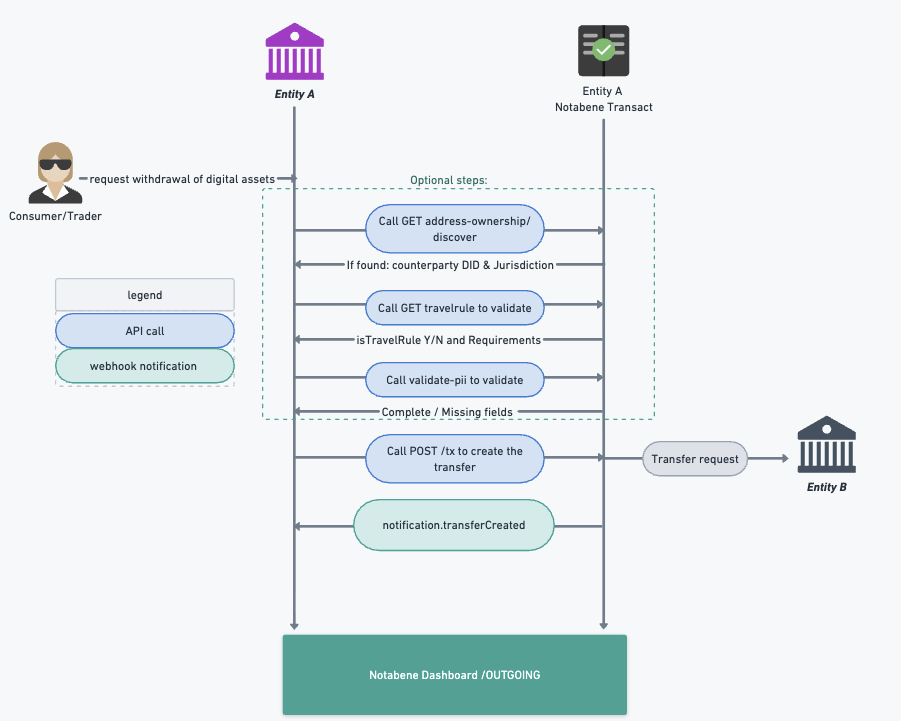
Discovering Counterparties (Optional)
Use the GET address-ownership/discover API to identify counterparties. This API supports CAIP19 standardized assets and CAIP10 addresses, or 'short' addresses with either 'Notabene asset' or CAIP19 asset. Supported combinations include:
- short address & Notabene asset
- short address & CAIP19 asset
- CAIP10 address & Notabene asset
- CAIP10 address & CAIP19 asset
The system checks if the destination address is known and confirmed, or queries blockchain analytics to identify the entity. Successful responses list the Agent and optionally their Custodian agent, with jurisdictions if known. The source and confidence of attribution are also included.
{
    "addressOwnership": {
        "address": "bip122:000000000019d6689c085ae165831e93:bc1q7avt8qgn3st8gckln23vmk262qud36247jubrg",
        "asset": "BTC",
        "confidence": "CONFIRMED",
        "agent": {
            "did": "did:web:vasps.id:exchange:de",
            "name": "TEST VASP",
            "jurisdiction": "DE"
        },
        "custodian": {
            "did": "did:web:vasps.id:custodian:sg",
            "name": "TEST CUSTODIAN",
            "jurisdiction": "SG"
        },
        "source": "ADDRESS_HASH",
        "discoveredAt": "2025-12-03T08:34:56.454Z",
        "responseTimeMs": 22
    }
Validating for Travel Rule (Optional)
Call GET /travelrule to validate whether your transfers is eligible for Travel Rule, depending the jurisdiction and amount in local currency.
Call GET /travelrule to check if your transfer is subject to the Travel Rule, based on jurisdiction and local currency amount. This API is useful when users are on your withdrawal page/form, collecting necessary data points.
With the discovered counterparty jurisdiction and local currency amount, this API determines if the transfer is subject to the Travel Rule and provides a link to a requirements overview:
{
    "isTravelRule": true,
    "presentationDefinitionURL": "https://pd.notabene.id/ivms101/v2/DK-0.json"
}
Validating your PII (Optional)
Collect the required data points to meet both your jurisdictional requirements and, where possible, the counterparty's requirements. PII for Travel Rule purposes is submitted later, but you can optionally validate your collected PII in IVMS format against the validate-pii API. More on PII submission later.
Updated 3 days ago