
Reconcile received transfers
Learn how to reconcile received transfers using the match endpoint and create incoming transfers when necessary.
Reconcile transfer
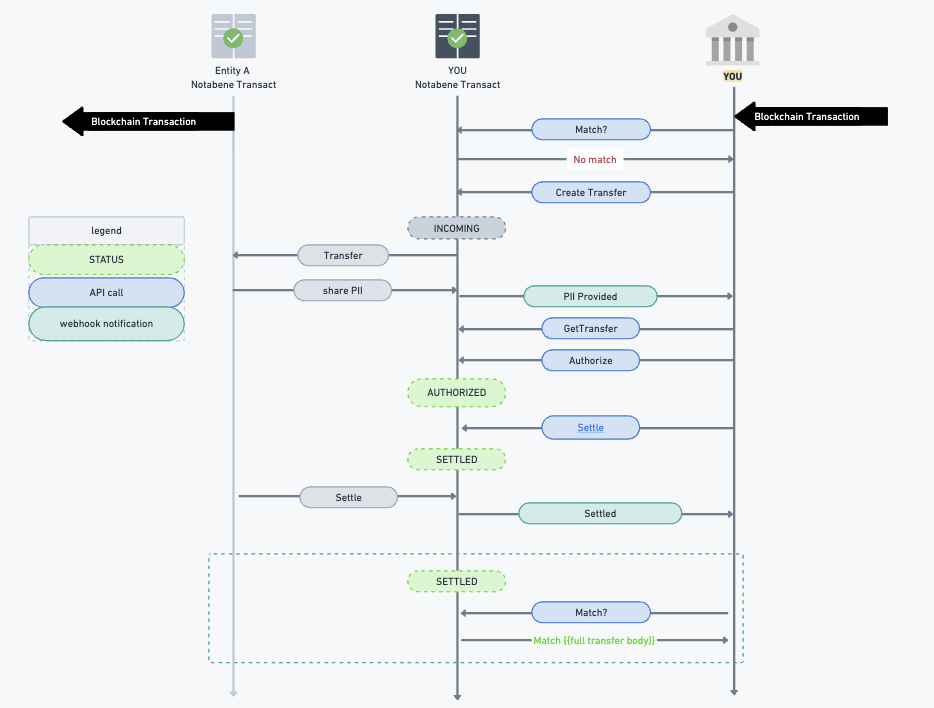
When you receive a deposit to your wallet, you need to check if it includes travel rule information before crediting the funds to your customer. Use the 'match' transfer API with the blockchain transaction data to find matching transfers.
How to Use the Match Endpoint
- Endpoint URL:
{{url}}/entity/:entityDID/transfers/match?settlement_id=&settlement_address= - Example:
curl --location 'https://notabene-d-qa-api.notabene.studio/entities/did:web:entity.id:MegaVASP/transfers/match?settlement_id=bd6931dd597ca271714f31bb82a6d105c1642e7e2e23c22ca4bc0b27700c3406&settlement_address=bc1qg8pdme74qjyuhfahusmg6tmtvc647yks04lc3t
--header 'Content-Type: application/json' \
--header 'Authorization: Bearer {{accessToken}}' \- Response 200 Success includes all transfers that match your search. The full transfer payloads are returned in the
datafield. -
{ "data": [{ "id": "122c62ee-9274-43f6-a118-1f01f0f199aa", etc. } ], "pagination": { "total": 0, "limit": 25, "offset": 0 }, "meta": { "match_strategy": "broadened", "broadened_candidates": 0 } } - The settlementId and settlementAddress fields are mandatory. Otherwise a 400 bad request is returned.
Optional Parameters
- Transaction Index:
settlement_id_indexfor batched transfers. - Memo/Tag:
memo_tagfor specific coins/chains. - Limit: Maximum number of transfers to return.
- Offset: Number of transfers to skip.
- Direction: OUTGOING, INCOMING.
- Fields: Comma-separated list of fields to include.
- Sort By: Field to sort transfers by.
- Sort Order: asc, desc.
Create incoming transfer
If no match is found, you can create the transfer. Options include:
- Request for Info flow - to a know sender
- Post Deposit flow - collect data from your own customer
Request for Info flow
Known Sending Entity: Create the transfer as the receiving entity.
Steps:
- Call tx Create with all known entities
- Direction will be INCOMING, status OUTGOING
- Transfer message gets sent to the Originator entity with request for Travel Rule (if applicable)
- Optionally call tx Settle, to mark the transfer as SETTLED.
- ... normal flow continues: e.g. Originator entity responds with Originator and if applicable, Beneficiary PII to fulfil your and their compliance obligations.
Post deposit assist flow
Unknown Sending Entity: collect the originator data from your beneficiary end user/customer. This applies in cases:
- where the originator entity is not known or self hosted
- where the originator entity is known but not responding.
Use Notabene's SafeConnect Components: Embeddable UI elements to gather information.
For more details, refer to SafeConnect Components. Especially to the section 'Deposit Assist'.
Updated 8 months ago