
Settlement Process
Learn about the settlement process, handling incoming transfers, and managing flagged settlements with clear instructions and improved accessibility.
Once the Originator Agent sends the transfer on-chain, they update it with the transaction settlement ID (txHash). This triggers a notification to you and other relevant agents, updating the transfer state from Authorized to Settled and include the settlementId.
Handling Incoming Transfers
For transfers received on-chain without a Settle message from the Originator, you can update the status to Settled. Use the following endpoint:
{{url}}/entity/:entityDID/tx/:tx/settle
Clearing Incoming Settled Transfers
Optionally, clear incoming transfers to indicate that the funds can be credited to the destination or user:
{{url}}/entity/:entityDID/tx/:tx/clear
For more details, refer to the Postman collection.
Reject Incoming Settled Transfers
To initiate a Freeze and or Revert flow from a Settled transfer: Call Reject.
This moves the transfer to Flagged Settlement status, allowing you to freeze or revert the transfer.
Flagged Settlements
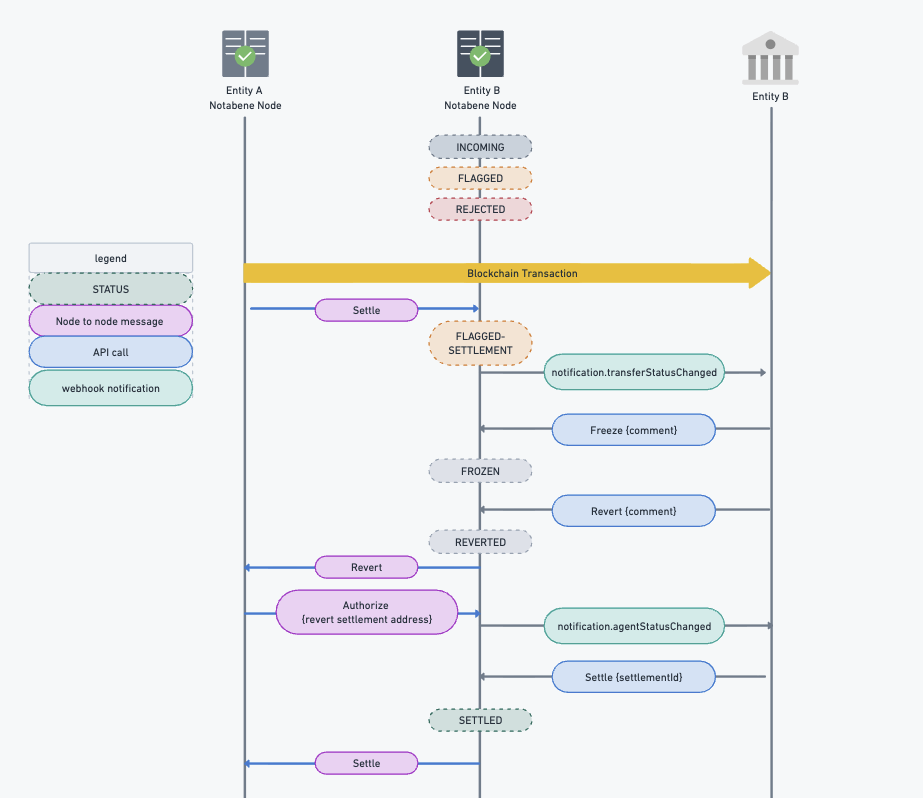
If a Settle message is sent for a non-authorized or rejected transfer, the state changes to Flagged-Settlement. Decide whether to accept, freeze, or revert the transfer.
Freeze
Freezing signals that funds cannot be credited.
Revert
Request a reversal of a settled transaction in either Flagged-Settlement or Frozen state. This may be part of a dispute resolution or post-transaction compliance checks.
The originating entity will see the transfer in Revert Requested state and can authorize it, providing the destination settlement address. Upon receiving this, you can continue the process, send the funds on-chain, and call Settle with the on-chain transaction ID from the revert transfer.
Visual guide:
Updated 10 months ago