For AI agents: the docs index is at https://devx.notabene.id/v1.0/llms.txt. Append .md to any documentation page URL to get its markdown version.
Jump to Content
Notabene Travel Rule Integration
HomeGuidesRecipesAPI ReferenceReleases
GuidesReleasesPostmanRecipesAPI ReferenceNotabene Travel Rule Integration
Guides
GuidesReleasesPostmanRecipesAPI Reference
Diagrams
  • Sunsetting v1 of Notabene
  • Introduction
  • Authentication
    • Generate API credentials
    • Generate accessToken
    • Generate customerToken
  • Flow diagrams
  • Travel Rule statuses
  • Identifying your counterparty
  • Nested VASPs
  • Coins & Decimals
    • Supported Assets
    • Unsupported Assets
  • Webhooks
    • Trigger webhook
    • Notification webhook
  • Encryption
    • Encryption flows
    • Key management
  • Marketplace
    • Sanctions screening
      • Configuration
      • Diagrams
    • Blockchain Analytics
    • External screening
  • SDKs
    • Node SDK
    • PII SDK
  • Front-end data collection
    • Validation API
  • Creating travel rule messages
    • Payload validation (optional)
    • Using txCreate
    • Adding transaction hash/origin wallet
  • Receiving travel rule messages
    • Upload CSV or register single address
    • Using notification webhook
    • Verify beneficiary details - name match
    • Dealing with duplicate hashes
  • Checking blockchain deposits for travel rule
    • Using txNotify
    • Incomplete message - how to collect data?
    • Updating an incomplete message
  • SafeConnect Components
    • Configuring the SafeConnect Components
    • Component Events
    • Embedded Components + V1 API
    • Self Hosted Wallet Proofs
    • FAQ
  • Testing/Errors
    • RoboVASPs
    • Error Messages
    • API Testing Script
  • Rate limiting
  • Notabene IPs
  • Fireblocks Integration Overview
    • Sending and Receiving Travel Rule Messages - Fireblocks
    • Integrating Notabene Into Your Fireblocks Policies
    • Using Notabene, Fireblocks and Blockchain Analytics
    • Testing and FAQ
    • Diagrams
  • Mastercard Crypto Credential
  • TRUSThub connector (beta)
  • Transfers
    • Create a Travel Rule Transfer
    • Respond to Travel Rule Transfers
    • Permalink to Transfer Detail View
    • Understanding Transfer Categories
    • Understanding the Transfer Status
    • Internal transfers
    • What is “Opportunistic Compliance”
    • When to use 'Send on My Behalf'?
    • Search and Filter Travel Rule Transfers
    • Export Travel Rule Data
  • Overview
    • Dashboard Data Definitions
    • The Outstanding Tasks Summary
  • VASP network
    • VASP Network
    • What is a Super Vasp?
    • VASP Lists
    • Top 20 Counterparty VASPs
    • Notabene's VASP Entity Management Tool
    • Identify and Verify Counterparty VASP
    • Network Badges
  • My company
    • SafeConnect Profiles
    • How to Upload Corporate Documents
    • What is the Due Diligence Questionnaire?
    • How to request access to a counterparty’s Due Diligence Questionnaire
  • Account management
    • Understanding the Role of a Group Admin
    • Group Admin FAQ
    • How to Add Members to the Dashboard
    • Member Roles and Permissions
    • Compliance Tools Integrations
    • How to Connect Your Compliance Tools
    • Understanding How Compliance Tools Work with Notabene
    • Notabene's Rules Engine
    • Custom Rules Deep Dive
    • Rule Methodology Configuration
    • Rules Template Configuration for EU
    • Auto-Confirm Your Customer's Blockchain Addresses
    • Blockchain Transaction Authorization
    • Auto-decryption
    • Creating a Secondary VASP
    • Setting Up a Group VASP
  • First steps
    • The process of implementing Travel Rule
    • Notabene's SafeTransact-Rise (Sunrise Plan)
    • Creating an account
    • How to claim a VASP
    • Travel Rule Certification FAQ
    • Understanding Your Mailing Preferences
    • The Status Page
    • Payments Notifications
  • Features explained
    • Safe Implementation
    • SafePII: How Notabene encrypts end-user PII
    • SafeGateway
    • SafeTransact for Networks
    • Legal Entity Identifier (LEI)
  • What is SAFE Implementation
  • Implementation Phase 1 - SPARK
  • Implementation Phase 2 - AMPLIFY
  • Implementation Phase 3 - FOUNDATION
  • Implementation Phase 4 - ELEVATE
  • Incoming transfers
    • Deposit Missing Travel Rule Transfer
    • Streamlining Your Response Process in 3 Easy Steps
  • Outgoing transfers
    • Why Was My Transfer Declined?
    • Transfers to VASPs Outside the Network
    • Sending to Self-hosted Wallets
    • Pending Transactions Email Notifications
    • Preventing Duplicate Travel Rule Transfers
Powered by 

Diagrams

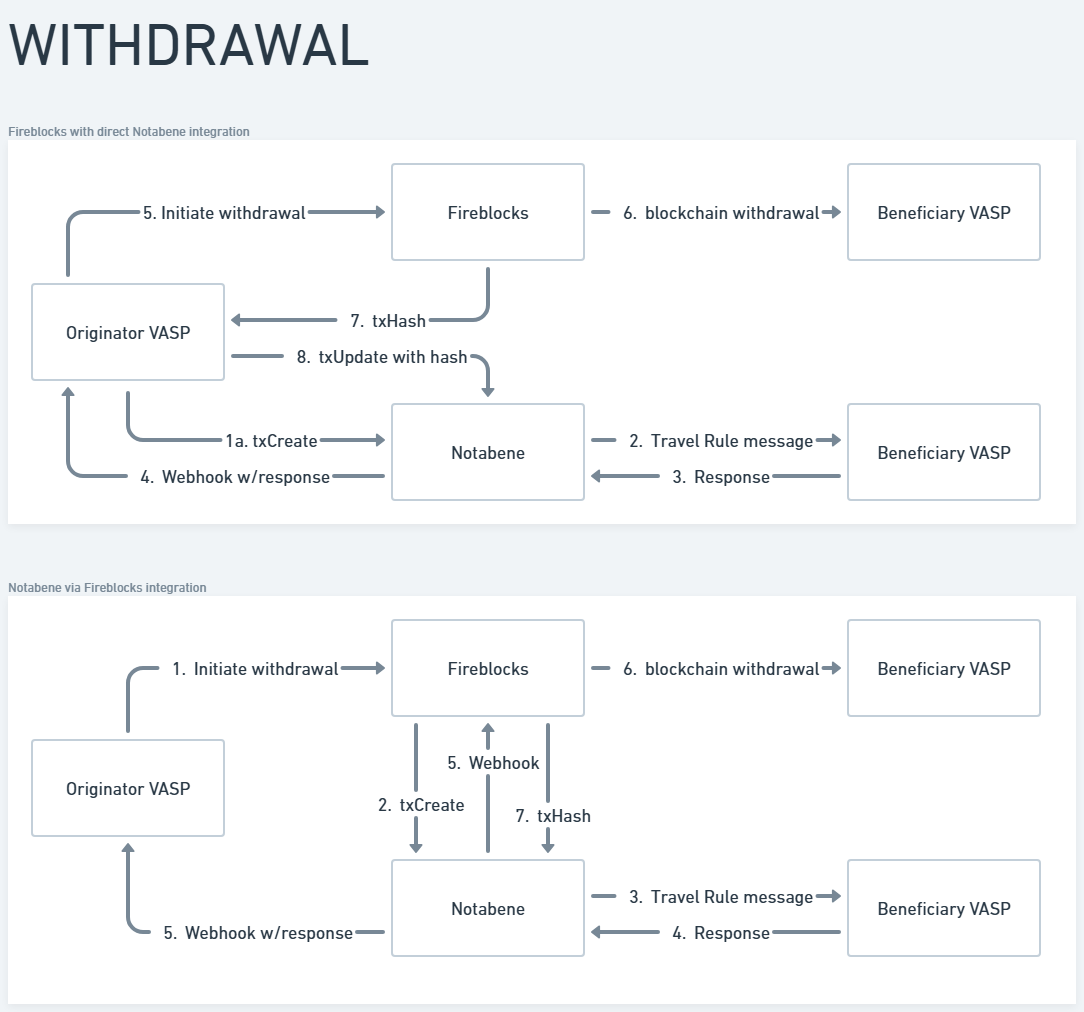
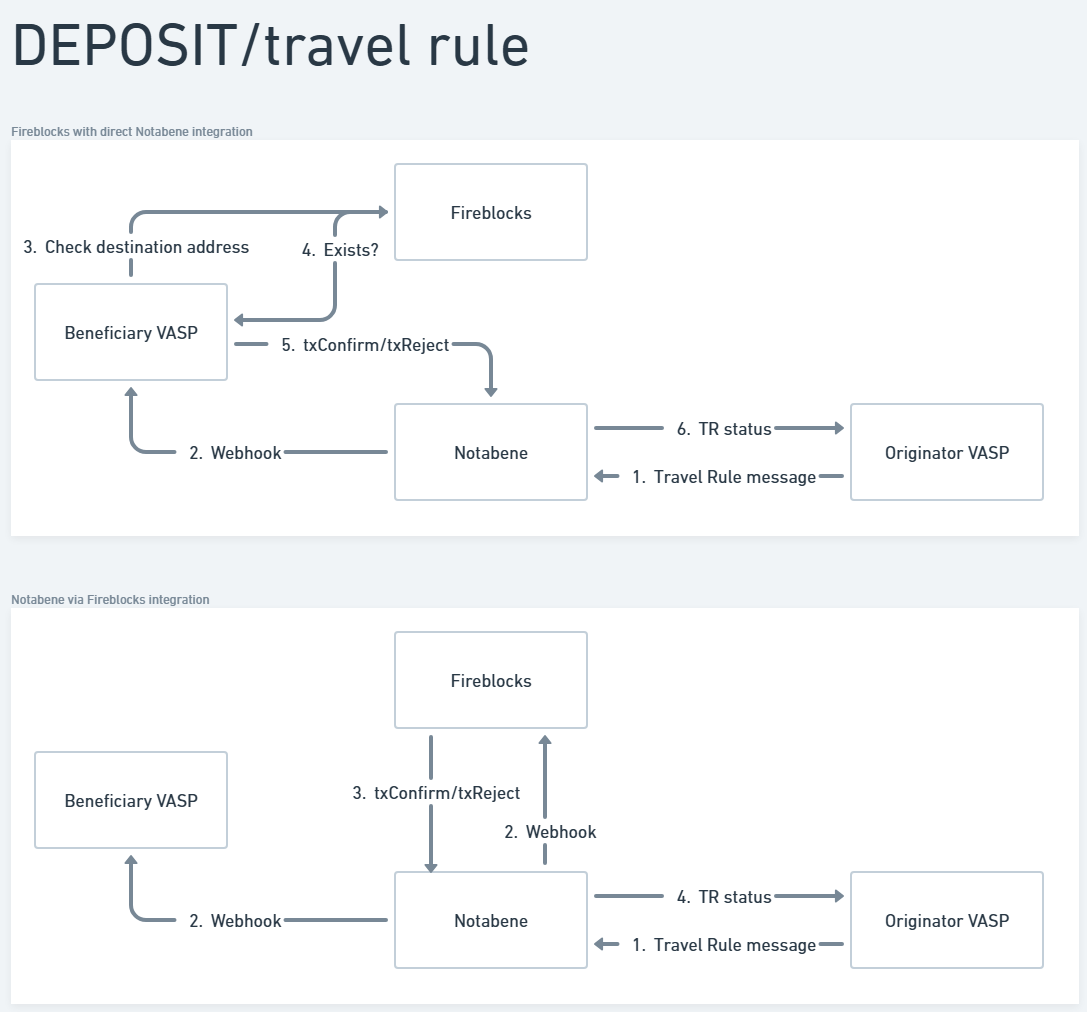
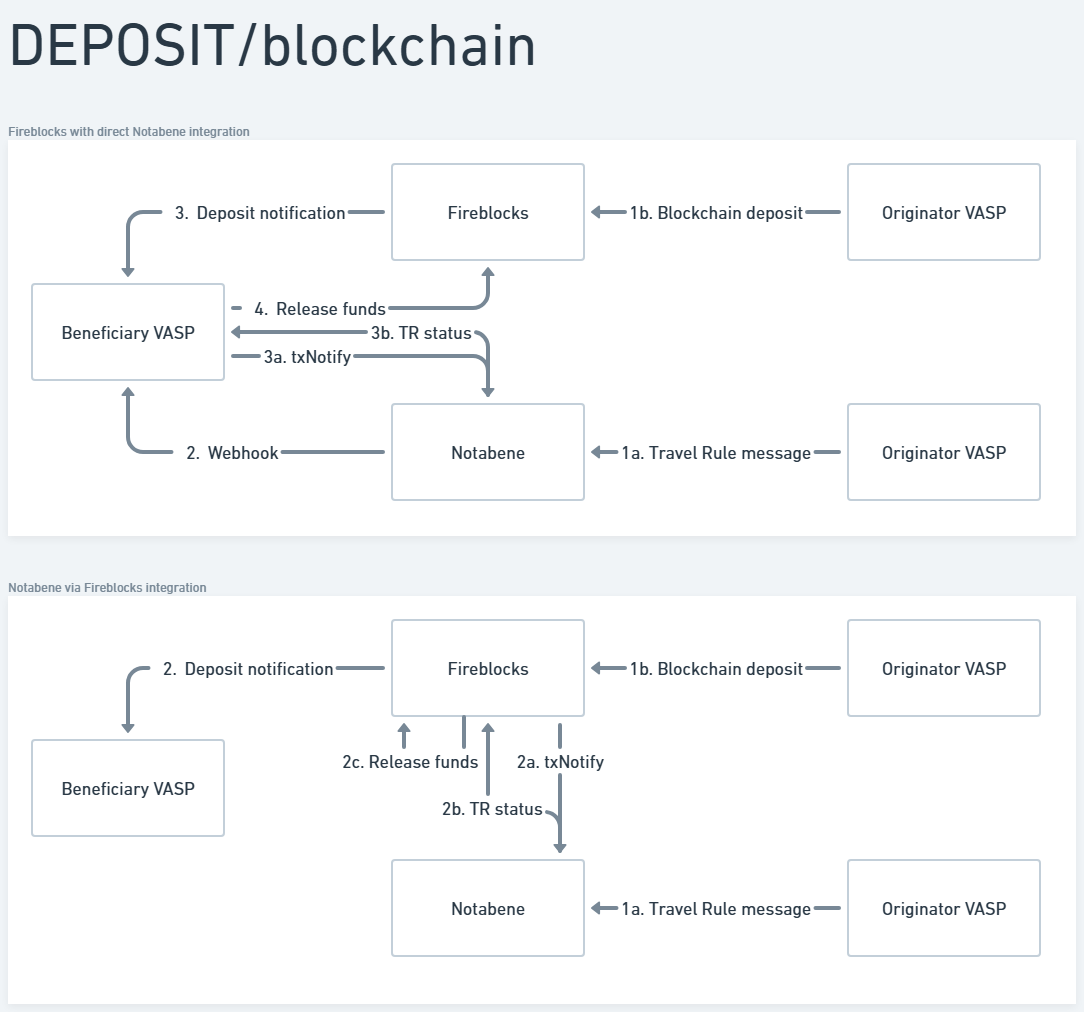
Here you will see a comparison between integrating separately with Notabene vs. through Fireblocks.

Withdrawal flow


Deposit - travel rule flow


Deposit - blockchain flow

Updated about 3 hours ago


Testing and FAQ
Mastercard Crypto Credential
Did this page help you?
    • Withdrawal flow
    • Deposit - travel rule flow
    • Deposit - blockchain flow