
Self Hosted Wallet Proofs
Collecting non-custodial wallet proofs
Which embedded components support self-hosted wallet verification?
- Withdrawal Assist
- Deposit Assist
- Connect Wallet
What is self-hosted wallet verification?
Self hosted wallet verification is a process in which a person proves ownership of a blockchain wallet address. This can be a requirement before transferring virtual assets from a VASP to a non-custodial wallet or self hosted wallet. By implementing self hosted wallet verification VASPs can have confidence that their users are sending assets from their centralized accounts to a wallet they own.
Notabene provides support for the following methods of wallet verification:
- Cryptographic Signature Proofs
- Micro Transactions (aka satoshi tests or penny drop tests)
- Wallet Screenshots
- Self-Declaration
Proof of ownership is required in the EU starting in 2025, read more here.
Cryptographic Signature Proofs
Signature proofs are a form of wallet ownership proof in which the user uses their private keys to sign an off-chain message, which can then be verified using their public blockchain address. This cryptographically proves that the user holds the private keys of the wallet where they intend to transfer funds.
Signing a message with an embedded component
Below is a video of an off-chain signature for an ETH address using a Metamask non-custodial wallet.
The Notabene embedded components perform the following steps to provide a smooth UX:
- Connect to the user wallet
- Prompt the message to be signed in the user's wallet
- Retrieve and validate the signature
Manual Signature
Below is a video of an off-chain signature for a BTC address using Electrum software wallet:
Additionally the embedded components support manual signatures with the following UX flow:
- User is shown a message to sign
- User copies message from embedded component into wallet
- User signs message with wallet keys
- User pastes signed message back into the embedded component
Supported Blockchains for Cryptographic Signature Proofs
| Blockchain | Wallets | Proof Type |
|---|---|---|
| Bitcoin | Ledger, Trezor, Xverse* + user-supplied signature | bip-137, bip-322 |
| Bitcoin Cash | user-supplied signature | bip-137 |
| Doge | user-supplied signature | bip-137 |
| LiteCoin | Ledger, Trezor, user-supplied signature | bip-137 |
| Ethereum | Metamask, TRUST Wallet, 200+ wallets listed here | eip-191 |
| Polygon | Metamask, TRUST Wallet, 200+ wallets listed here | eip-191 |
| Optimism | Metamask, TRUST Wallet, 200+ wallets listed here | eip-191 |
| Arbitrum | Metamask, TRUST Wallet, 200+ wallets listed here | eip-191 |
| All EVM Chains | Metamask, TRUST Wallet, 200+ wallets listed here | eip-191 |
| Solana | Solflare, OKX Wallet, Phantom | ed25519 |
| Tron | Tron Link*, Ledger + user-supplied signature | tip-191 |
| Ripple | Gemwallet* + user-supplied signature | xrp-ed25519 |
| Cardano | Yoroi, Eternl | cip-8 |
| Stellar | user-supplied signature | xlm-ed25519 |
*Tron Link, Gemwallet and Xverse only work outside of an iframe (i.e. the component is rendered as a popup). This is not a Notabene restriction but a restriction coming from the wallet.
Passing the proof to txCreate
The type must be one of the following proof types listed in the chart above.
Ethereum example (metamask):
"beneficiaryProof": {
    "proof": "0x3dd4a17a...ce4a2bcd1b",
    "attestation": "I certify that ETH account 0x896B....0b9b belonged to did:key:z6Mk...z2Zn on Thu, 12 Sep 2024 16:00:33 GMT",
    "address": "0x896B...0b9b",
    "type": "eip-191",
    "wallet_provider": "injected"
}
BTC example (user supplied signature):
"beneficiaryProof": {
    "proof": "H3V8GXBy39Dz...tr3TSTkY=",
    "attestation": "I certify that BTC account 1442...dxhsQ belonged to did:key:z6Mk...z2Zn on Thu, 12 Sep 2024 18:24:34 GMT",
    "address": "1442...dxhsQ",
    "type": "bip-137",
    "wallet_provider": "manual"
}
Microtransactions (Satoshi Tests)
Notabene also supports micro transactions. A Satoshi test is a verification process that involves sending a specified amount of cryptocurrency from the destination address within a particular time window to confirm control of the wallets private keys.
| Blockchain | Wallets | Available in txCreate | Available in Javascript SDK |
|---|---|---|---|
| All blockchains | Any wallets | Live | Live |
Flow with Javascript SDK
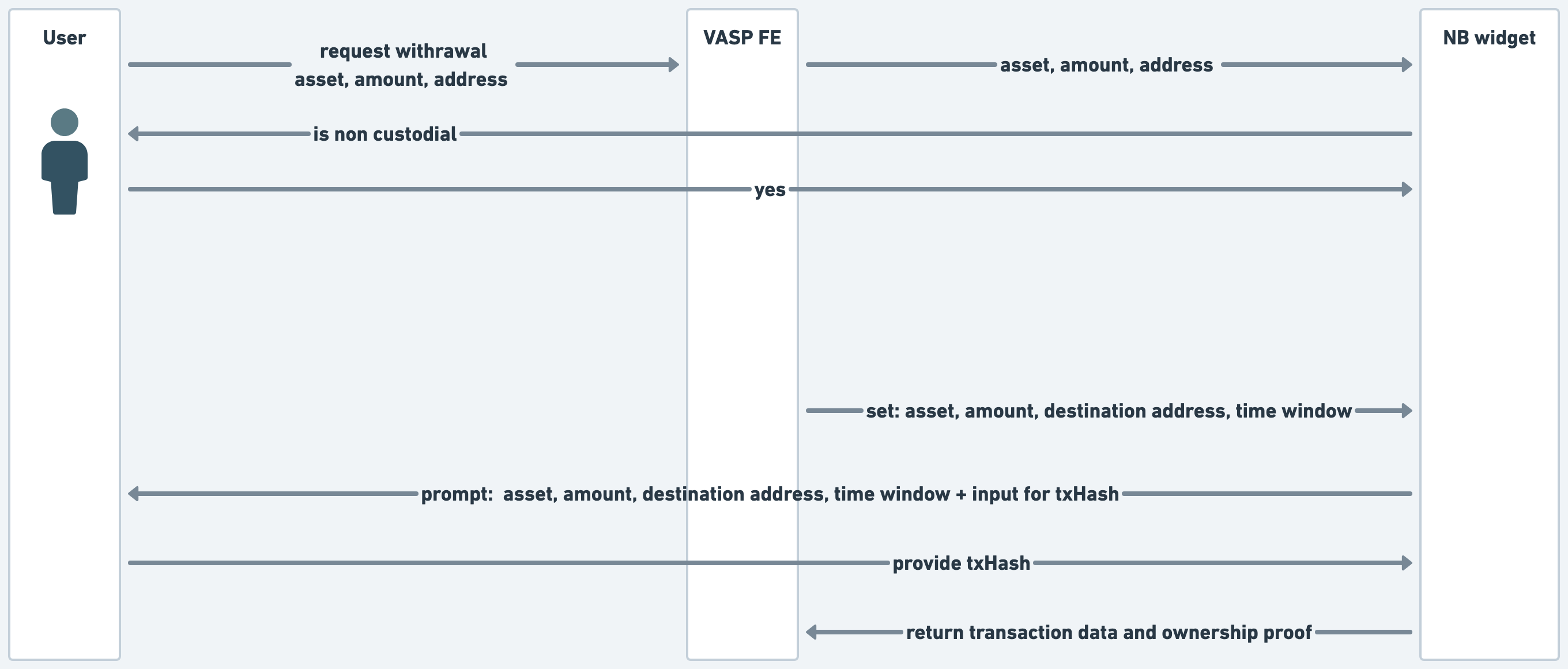
Format of the proof object
"beneficiaryProof": {
      "did": "did:pkh:bip122:000000000019d6689c085ae165831e93:bc1qwxnhjm6xlplu2dz8xpju3jczg8hu7894fwcjex",
      "type": "microtransfer",
      "status": "pending",
      "address": "bip122:000000000019d6689c085ae165831e93:bc1qwxnhjm6xlplu2dz8xpju3jczg8hu7894fwcjex",
      "proof": "1f7b31726c86ae4a9132e73ebed9e3370f7fb6bb413a960600029516b6716363",
      "chain": "bip122:000000000019d6689c085ae165831e93",
      "destination": "eip155:1:0x123abc...",
      "amountSubunits": "10000"
    },
Screenshots
Notabene supports screenshots as a method of wallet proof ownership. The withdrawal assist and deposit assist components collect the screenshot and then a compliance officer can review its validity in the Notabene dashboard.
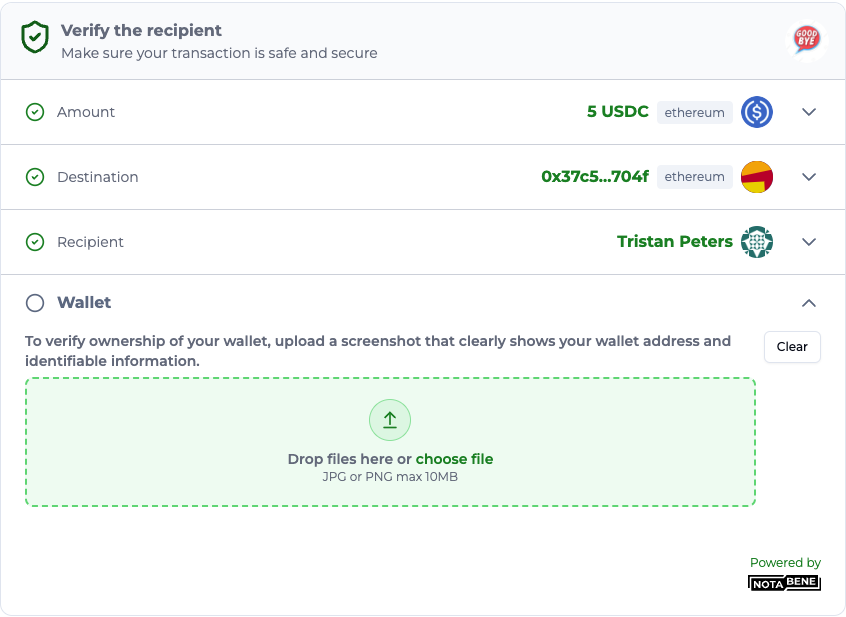
| Blockchain | Wallets | Available in txCreate | Available in Javascript SDK |
|---|---|---|---|
| All blockchains | Any wallet | Live | Live |
Flow with Javascript SDK
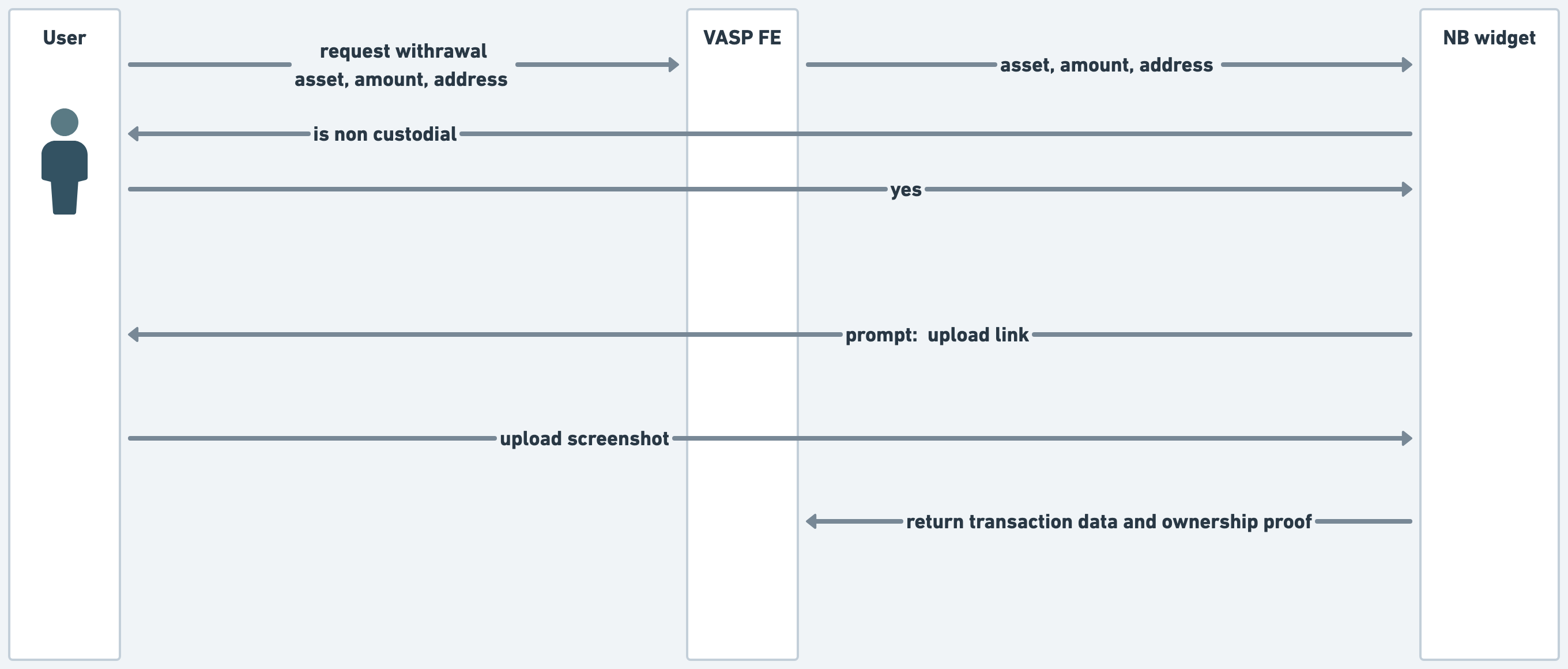
Format of the proof object
"beneficiaryProof": {
    "type": "screenshot",
     "url": "upload_link"
}
Submitting a screenshot not collected with the SDK in txCreate
To submit a visual proof collected autonomously (not using our JS SDK) with a TR transfer, the format above has to be provided in Create transfer, and the URL where the image is hosted has to be available on the internet for a short time required for Notabene to import the image.
Below an example visual proof that will populate you travel rule message with an image:
   "beneficiaryProof":{
    "url": "https://upload.wikimedia.org/wikipedia/commons/7/71/2010-kodiak-bear-1.jpg",
   "type": "screenshot"}
The import is async so when the response of txCreate is received is possbile that the image is still being imported. To check if the import has been finalized before deleting the image, you can perform a GET request using this API and specifying the s3Keyfield that we return in the response of txCreate .
Example request:
curl --location '{{{baseURL}}}/resolve-image?s3Key={{s3Key}}' \
--header 'Authorization: Bearer {{token}}'
If you get a 404, it means the image is not yet uploaded; if 200, you can go ahead and delete the image on your side.
Self-declaration (checkbox)
Notabene provides an option for checkbox attestation in which the user confirms they are indeed the owner of the self hosted wallet address.
| Blockchain | Wallets | Available in txCreate | Available in Javascript SDK |
|---|---|---|---|
| All blockchains | Any wallet | Live | Live |
Self attesting the control using the Javascript SDK
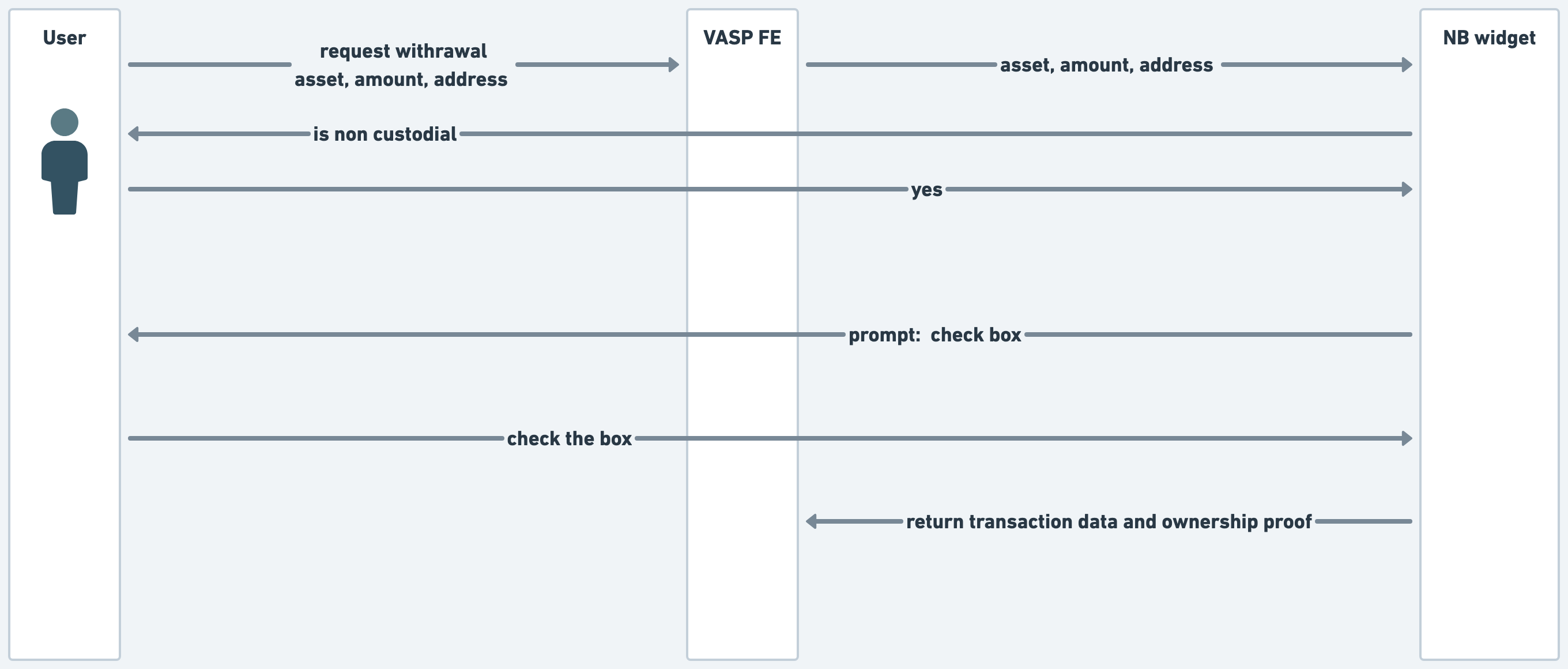
Format of the proof object
"beneficiaryProof": {
    "type": "self-declaration",
    "did": "did:pkh:eip155:1:0xa437bEed902AF9338B7DEB23848e195d85019510",
    "address": "eip155:1:0xa437bEed902AF9338B7DEB23848e195d85019510",
    "attestation": "I hereby declare that the blockchain address 0xa437bEed902AF9338B7DEB23848e195d85019510 is under my own control and ownership.",
    "confirmed": true,
    "status": "verified"
},
"beneficiaryProof": {
"type": "checkbox",
"proof": "checked"
}FAQ
Can I reuse signature proofs?
Yes! Signature proofs can be re-used for later transactions to the same destination address. Here is a video demonstrating.
What do I do for third-party transfers?
For third party transfers there are two options. Option 1: the user can self declare (checkbox) that the beneficiary name they provide is the owner of the destination wallet. Option 2: The user can send a link to the beneficiary (counterparty assist) and the beneficiary will provide their name and required information plus complete a proof of ownership of the wallet.
Which of these proofs show up on chain?
Only micro transactions (satoshi tests) show up on chain. Cryptographic signatures will not show up on chain nor will screenshots and self-declaration proofs.
How do I know which assets are supported?
Micro Transactions, Self-declaration and screenshoots all support any asset. Support for cryptographic signature is not based on asset but is instead based on the blockchain of the asset and wallets technical capabilities. The table above has Notabene's current blockchain support for signature proofs.
How do I handle transactions involving multiple UTXOs?
For deposits coming from multiple UTXOs, if the client has verified 1 input address, then the other 3 input addresses can be considered verified. This is because the transaction itself serves as proof that all 4 inputs are controlled by the same person/entity (the client has to know the private keys to all 4 input addresses, otherwise the transaction won’t be accepted by the blockchain). So as long as one of the inputs is verified that should be sufficient as part of a risk based approach.
Updated about 3 hours ago