
Using txNotify
Every time your VASP receives a blockchain deposit, you should use txNotify to check if it came with travel rule data. txNotify takes blockchain data about the deposit and compares it against the blockchain data in your recieved travel rule messages:
{
    "txHash": "0xc93e0d531a233fe207808feb3c9d224694fa8c5313ac59ff54ef50f67e1aa55a",
    "transactionAmount": "1234000000000000",
    "transactionAsset": "ETH",
    "beneficiaryVASPdid": "{{vaspDID}}",
    "destination": "0x95dceec19dcc8ea575e4acc9ded3e800b4170fda",
    "origin": "0x061f7937b7b2bc7596539959804f86538b6368dc"
}
When you call txNotify, it will look into your received travel rule messages, and if we find a corresponding one that matches txHash + origin address + destination address + beneficiaryVASPdid, it will return the status and some details about that travel rule message.
Delay in adding txHashSince the txNotify checks if there is a matching transaction hash to see if there is a travel rule message for it, this only works if the hash has been added by the originating VASP, after the value transfer has been processed on the blockchain.
In some cases it might take them a short while to add the hash, so we recommend having a small delay between recieving the deposit and calling txNotify for it.
You can also call txNotify with the same payload multiple times with an exponential delay in between retries. If the originator VASP suddenly adds the hash between those retries, txNotify will return the actual travel rule message instead of the one that was created as "incomplete."
The retries should probably not last longer than 1 hour.
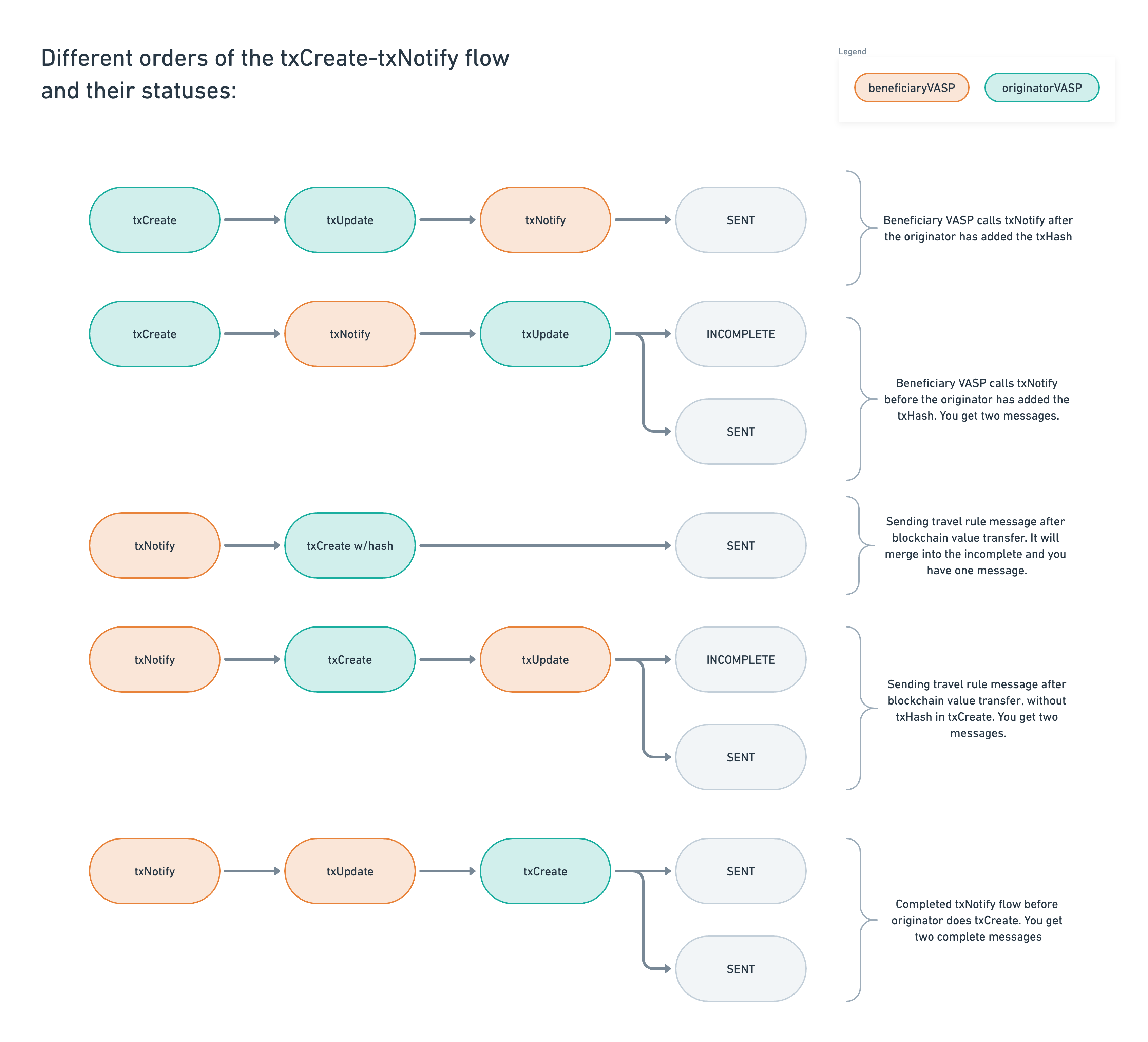
If you do txNotify bfore the originating VASP has added the txHash to the travel rule message, you will end up with two "duplicates". You can keep both versions or cancel the one that is incomplete, if the data hasn't already been collected from the person receiving the deposit and added to the incomplete one.
txNotify responses
You should have different actions based on the different statuses that calling txNotify might return:
ACCEPTED
If the status of the message is ACCEPTED, you can usually release the funds to the customer.
{
    "id": "c5e0569a-edee-48ea-8946-9320fcdf9611",
    "status": "ACCEPTED",
    "transactionType": "TRAVELRULE",
    "transactionAsset": "BTC",
    "transactionAmount": "1234000000000000",
    "chargedQuantity": 313078140000,
    "showToBeneficiary": true,
    "originatorDid": null,
    "beneficiaryDid": "did:ethr:0x86f5388895c840b6b9ff45045df751e3bb8ee761",
    "originatorVASPdid": "did:ethr:0x940a4b2a0932733b842e4aa906761bb3d3bd8148",
    "beneficiaryVASPdid": "did:ethr:0xd4bd902ec78578f33a20ff601504d2ab324cfab9",
    "transactionBlockchainInfo": {
        "txHash": "0xc93e0d531a233fe207808feb3c9d224694fa8c5313ac59ff54ef50f67e1aa55a",
        "origin": "0x061f7937b7b2bc7596539959804f86538b6368dc",
        "destination": "0x95dceec19dcc8ea575e4acc9ded3e800b4170fda"
    },
SENT or ACK
If the status is SENT or ACK, it means that you haven't yet processed the incoming travel rule message. Here, you should withhold the funds from your customer until your compliance team has reviewed it.
{
    "id": "c5e0569a-edee-48ea-8946-9320fcdf9611",
    "status": "SENT or ACK",
    "transactionType": "TRAVELRULE",
    "transactionAsset": "BTC",
    "transactionAmount": "1234000000000000",
...
DECLINED
If it has a negative status like DECLINED, your compliance team has decided that they did not like the deposit and it should be withheld from your customer.
{
    "id": "c5e0569a-edee-48ea-8946-9320fcdf9611",
    "status": "DECLINED",
    "transactionType": "TRAVELRULE",
    "transactionAsset": "BTC",
    "transactionAmount": "1234000000000000",
...
REJECTED
In theory, you should never recieve this status when calling txNotify since this means you declared that the destination wallet was not yours when receiving the travel rule message. However, since you did call txNotify for a deposit with this address, it must actually be yours and there was a mistake somewhere.
INCOMPLETE
If no corresponding travel rule data for the transaction hash is found, a new one will be automatically created with the available data from your txNotify request. This travel rule message will be created with the INCOMPLETE status:
{
    "id": "c5e0569a-edee-48ea-8946-9320fcdf9611",
    "status": "INCOMPLETE",
    "transactionType": "TRAVELRULE",
    "transactionAsset": "BTC",
    "transactionAmount": "1234000000000000",
...
Pre-populated originatorVASPdidThe
originatorVASPdidmay or may not be pre-populated in an incomplete travel rule message. It depends on if Notabene or blockchain analytics was able to identify the originator VASP based on the origin wallet address or not.If the originator VASP is identified and the message is incomplete, this will create a data request on the originators side.
Diagrams
Please see here for the txNotify status diagram.
Please see here for the txNotify flow diagram.
Calling txNotify too fast
Please see the diagram below of what happens when txNotify is called too soon, or if the originator deviates from the normal txCreate flow:
txNotify for UTXO transactions
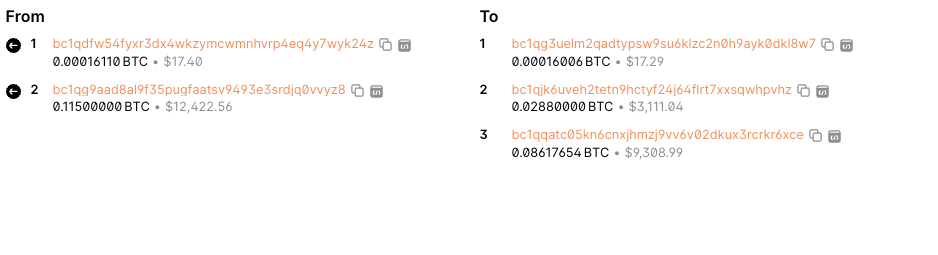
Multiple Inputs -> One Output
Call txNotify once per the whole transaction with no origin address, use the output address as the destination address and make sure to include the txHash.
Multiple Inputs -> Multiple Outputs
Call txNotify once per output that you own, use the output address as the destination address and do not include an origin address. Make sure to include the txHash.
Example
{
    "txHash": "0df071aabb1a11bb553b0fa213fbbbbee5f4663e6e8534bcab78817ed493e4f9",
    "transactionAmount": "6999000000",
    "transactionAsset": "BTC",
    "destination": "bc1qg3uelm2qadtypsw9su6klzc2n0h9ayk0dkl8w7",
    "beneficiaryVASPdid": "{{vaspDID}}",
    "customerRef": "[email protected]"
}
Updated about 4 hours ago