

Requirements
A requirement is something that must happen before an institution can be authorized on a transfer, or before its customer’s personal data leaves. Each one is set by an institution and met either by that same institution or by the counterparty, so a transfer carries requirements on both sides at once.
The requirements
Which requirements a transfer carries depends on the preset each institution chose under Authorization Rules › Requirements, as Policies explains, and on the transfer itself. The last column is what the transaction page offers your team.
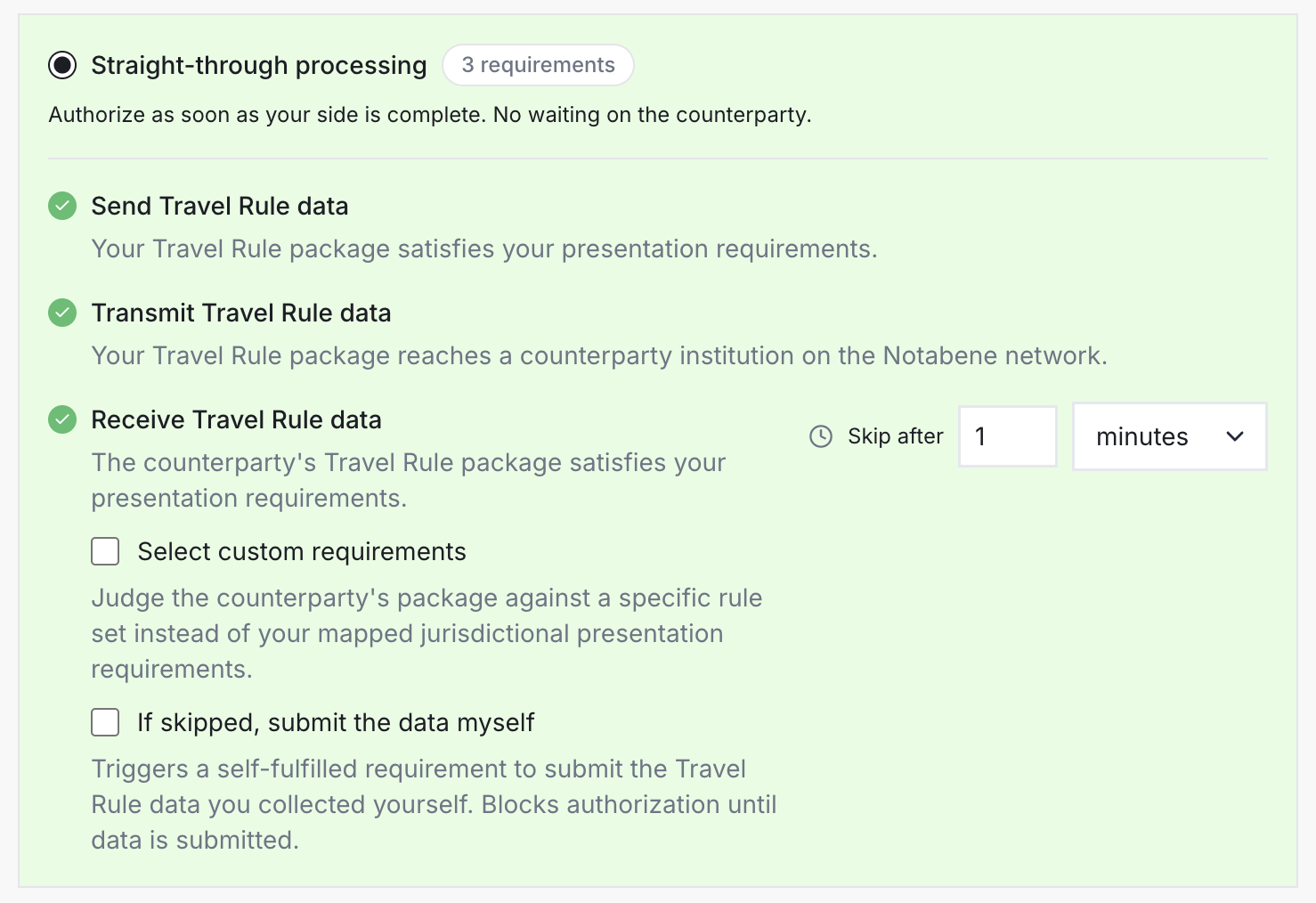
| Requirement | Set by | Met when | In the dashboard |
|---|---|---|---|
| Send Travel Rule data | You, as the sender | Your Travel Rule data for the transfer is complete. It holds the sending, not your authorization. | Add data, while some is missing |
| Transmit Travel Rule data | You, as the sender | Your Travel Rule data has reached the counterparty. | Nothing to do, unless a flag holds the sending |
| Receive Travel Rule data | You, as the receiver | The counterparty sends its Travel Rule data. Below your own threshold it does not apply. | Waiting on counterparty |
| Submit Travel Rule data | You, as the receiver | You add the sender’s data yourself, once Receive Travel Rule data was skipped. It applies only when you turned on If skipped, submit the data myself, which is off by default. | Add data |
| Confirm beneficiary name match | You, as the receiver | Your team compares the beneficiary’s name with your records and answers. | Confirm match, then Match or Mismatch |
| Complete internal compliance checks | You, as the receiver | Your team finishes its own review and answers. | Satisfied or Rejected |
| Require wallet ownership confirmation | You, as the sender | The receiving institution confirms that the destination address belongs to its customer. | Waiting on counterparty |
| Require wallet ownership confirmation, added by Notabene | Notabene, for the sender | The receiving institution confirms the address. Until then, the transfer details travel but the personal data waits. | Waiting on counterparty |
| Require counterparty authorization | You | The counterparty authorizes the transfer. | Waiting on counterparty |
| Requirement | Set by | Met when | In the dashboard |
|---|---|---|---|
| Send Travel Rule data | You, as the sender | Your Travel Rule data for the transfer is complete. It holds the sending, not your authorization. | Add data, while some is missing |
| Transmit Travel Rule data | You, as the sender | Your Travel Rule data has reached the counterparty. | Nothing to do, unless a flag holds the sending |
| Receive Travel Rule data | You, as the receiver | The counterparty sends its Travel Rule data. Below your own threshold it does not apply. | Waiting on counterparty |
| Submit Travel Rule data | You, as the receiver | You add the sender’s data yourself, once Receive Travel Rule data was skipped. It applies only when you turned on If skipped, submit the data myself, which is off by default. | Add data |
| Confirm beneficiary name match | You, as the receiver | Your team compares the beneficiary’s name with your records and answers. | Confirm match, then Match or Mismatch |
| Complete internal compliance checks | You, as the receiver | Your team finishes its own review and answers. | Satisfied or Rejected |
| Require wallet ownership confirmation | You, as the sender | The receiving institution confirms that the destination address belongs to its customer. | Waiting on counterparty |
| Require wallet ownership confirmation, added by Notabene | Notabene, for the sender | The receiving institution confirms the address. Until then, the transfer details travel but the personal data waits. | Waiting on counterparty |
| Require counterparty authorization | You | The counterparty authorizes the transfer. | Waiting on counterparty |
A Mismatch on the name rejects the transfer and tells the sender why. When two institutions each wait for the other’s authorization and nothing else is open on either side, Notabene authorizes both, so neither waits forever on the other.
Requirements the counterparty sets for you
A requirement the counterparty sets shows on your transaction page under its own name, because you are the one who must meet it.
| The counterparty set | You see | What your team does |
|---|---|---|
| Receive Travel Rule data | Counterparty receives Travel Rule information | Nothing: Notabene sends your Travel Rule data. |
| Require wallet ownership confirmation | Confirm wallet ownership | Nothing in the dashboard. It is met by itself when the address is in My Wallets, and otherwise your developers answer it. |
| Require counterparty authorization | Authorization required | Authorize or Reject the transfer. |
| The counterparty set | You see | What your team does |
|---|---|---|
| Receive Travel Rule data | Counterparty receives Travel Rule information | Nothing: Notabene sends your Travel Rule data. |
| Require wallet ownership confirmation | Confirm wallet ownership | Nothing in the dashboard. It is met by itself when the address is in My Wallets, and otherwise your developers answer it. |
| Require counterparty authorization | Authorization required | Authorize or Reject the transfer. |
Registering your customers’ deposit addresses in advance, as Wallets explains, means you rarely confirm an address at all.
Statuses
Each requirement reads Pending, Satisfied, Partially satisfied, Skipped, Rejected or N/A, and Statuses explains each one and how they add up to your status. In the dashboard, a name check ends as Match or Mismatch, while a partial match can only come from your developers.
When a requirement waits
| What happens | The effect |
|---|---|
| Its time-out runs out | It reads Skipped, so no transfer waits forever on a counterparty that does not answer. The hold on personal data is the exception: it is never skipped. |
| The data arrives after its time-out | A skipped Receive Travel Rule data becomes Satisfied, or Partially satisfied when only part of the data arrives. |
| Receive Travel Rule data is skipped, with If skipped, submit the data myself on | Submit Travel Rule data reads Pending and holds your authorization until you add the sender’s data, as described in Deposits, funds first. |
| Your team authorizes with open items | Every open requirement your institution set reads Skipped. Those the counterparty set stay open, and so does the hold on personal data. |
| Your team skips or rejects it | Only the institution that set a requirement can skip or reject it by hand, and every skip is recorded in its audit log. The institution asked can still answer with a rejection. |
| What happens | The effect |
|---|---|
| Its time-out runs out | It reads Skipped, so no transfer waits forever on a counterparty that does not answer. The hold on personal data is the exception: it is never skipped. |
| The data arrives after its time-out | A skipped Receive Travel Rule data becomes Satisfied, or Partially satisfied when only part of the data arrives. |
| Receive Travel Rule data is skipped, with If skipped, submit the data myself on | Submit Travel Rule data reads Pending and holds your authorization until you add the sender’s data, as described in Deposits, funds first. |
| Your team authorizes with open items | Every open requirement your institution set reads Skipped. Those the counterparty set stay open, and so does the hold on personal data. |
| Your team skips or rejects it | Only the institution that set a requirement can skip or reject it by hand, and every skip is recorded in its audit log. The institution asked can still answer with a rejection. |
Every requirement sits under the institution that set it, and Transfers shows how both sides see the same transfer.
For your developers
Statuses and decisions in the API lists each requirement’s name in the API, its statuses there, and the call that answers the three requirements your backend can meet.
Updated 5 days ago