
Embedded Components + V2 API
Leveraging the V2 Notabene API to operationalize data captured by embedded components.
There are three things to notice when using the embedded component and version 2 of Notabene.
In the output it generates there is: originatorPersons, beneficiaryPersons and nameIdentifierType. These three have to be changed into their new name:
originatorPersons -> originatorPersonbeneficiaryPersons -> beneficiaryPerson
nameIdentifierType -> naturalPersonNameIdentifierType
Once that is done and the rest is in the correct format, you can call txAppend.
Using Withdrawal Assist with Transact (withdrawal flow)
Withdrawal Assist is used during a withdrawal flow to collect TR data:
- Render withdrawal assist to collect data.
- Call txCreate to create an outgoing transaction
- Call txAppend or txPresentation to add the collected PII data
- Confirm the Relationship (only if non-custodial proof is collected)
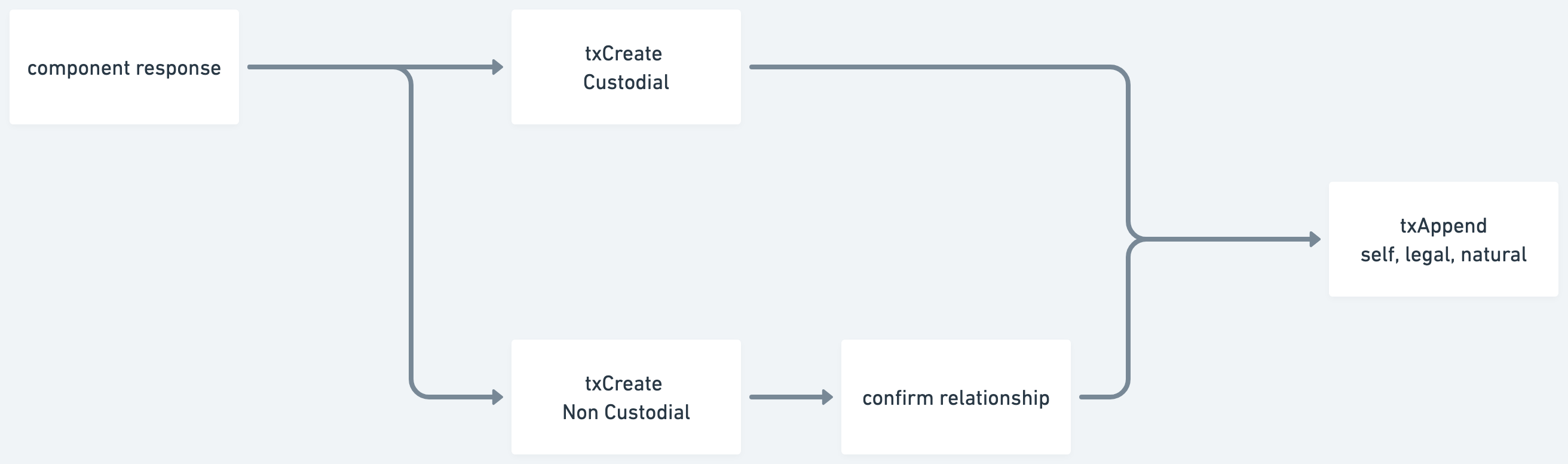
The javascript SDK used to render the embedded components has a build in helper function to transform the output of the embedded component into the required payload for the necessary txCreate, txAppend, and confirm relationship endpoints.
import Notabene, {
    componentResponseToTxRequests
} from "https://unpkg.com/@notabene/javascript-sdk@latest/dist/notabene.js";

const { createTx, ivms101, confirmRelationship: relationshipProof } =
componentResponseToTxRequests(
    completed.response,
    delegateToken,
    {
        originator: originator,
        originatorId: originatorId, // optional: originator reference ID
        beneficiaryId: beneficiaryId, // optional: beneficiary reference ID
        referenceId: transferRef
    }
);

// Create transaction
const transaction = await txCreate(accessToken, createTx);

// Append PII to transaction
const appendPiiResponse = await appendPii(accessToken, ivms101, transaction.transfer["@id"]);

// Confirm relationship (only if non-custodial transfer)
if (relationshipProof) {
    const confirmRelationshipResponse = await confirmRelationship(accessToken, relationshipProof, createTx.beneficiary["@id"]);
}Here is a full working example of using Withdrawal Assist with Transact API endpoints:
Using Deposit Assist with Transact (post deposit flow)
The Deposit Assist is used post deposit to collect missing TR data. This collection happens after txMatch:
- Call txMatch
- If TR already exists with complete data then no additional steps are necessary.
- If TR message does not exist then continue to step 2
- If TR messages does exist but data is missing continue to step 2
- Render embedded components to collect missing data
- If no TR message already exists then call txCreate an incoming transaction
- Call txSettle to mark the transaction as completed on chain.
- Call txAppend to add the collected PII data
- Confirm the Relationship (only if non-custodial proof is collected)
The javascript SDK used to render the embedded components has a build in helper function to transform the output of the embedded component into the required payload for the necessary txCreate, txAppend, and confirm relationship endpoints.
import Notabene, {
    componentResponseToTxRequests
} from "https://unpkg.com/@notabene/javascript-sdk@latest/dist/notabene.js";

const { createTx, ivms101, confirmRelationship: relationshipProof } =
componentResponseToTxRequests(
    completed.response,
    CONFIG.delegateToken,
    {
        beneficiary: beneficiary,
        originatorId: CONFIG.originatorId, // optional: originator reference ID
        beneficiaryId: CONFIG.beneficiaryId, // optional: beneficiary reference ID
        settlementAddress: CONFIG.settlementAddress, // optional: settlement address
        referenceId: CONFIG.transferRef // transfer reference ID
    }
);

// Create transaction
const transaction = await txCreate(accessToken, createTx);

// Append PII to transaction
const appendPiiResponse = await appendPii(accessToken, ivms101, transaction.transfer["@id"]);

// Confirm relationship (only if non-custodial transfer)
if (relationshipProof) {
    const confirmRelationshipResponse = await confirmRelationship(accessToken, relationshipProof, createTx.originator["@id"]);
}
[will link correct recipe after branch is merged!]
Here is a full working example of using Deposit Assist with Transact API endpoints:
Using Connect Wallet with Transact (relationship confirmation)
The completed response returned by the connect wallet component contains a proof object. This proof can be passed directly to the relationships endpoint to confirm a relationship. Read more about relationships here.
[will link correct recipe after branch is merged!]
Here is a full working example of using Connect Wallet to confirm a relationship:
Updated about 3 hours ago