
Webhook events details
Webhook events
The following events will trigger a webhook message from Notabene to you:
| Notification events | Summary |
|---|---|
| notification.transferAgentAdded | An agent has been added |
| notification.transferAgentReplaced | An agent has been replaced |
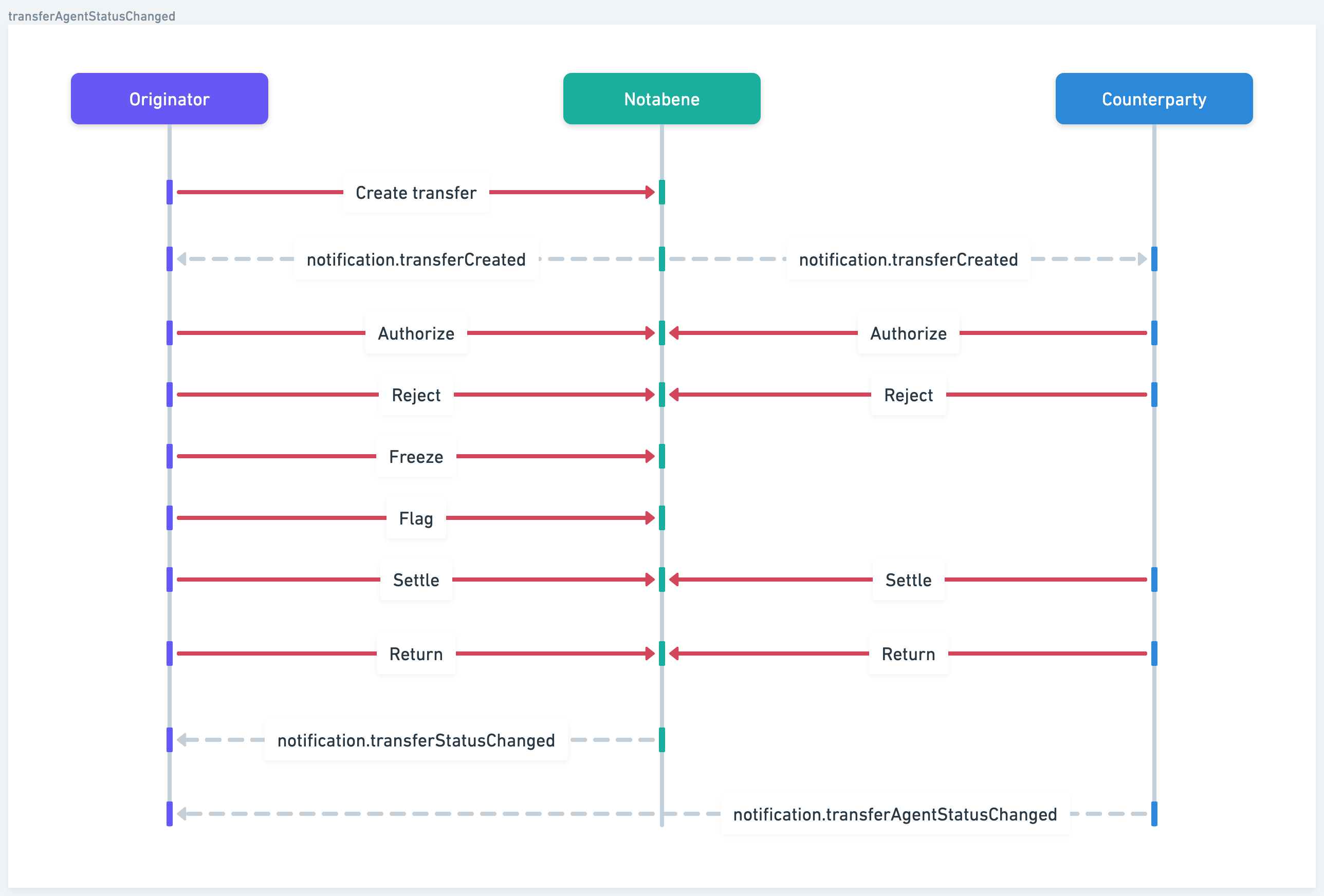
| notification.transferAgentStatusChanged | An agent has made a decision: authorized/rejected/flagged/etc. |
| notification.transferCreated | A message has been created by you, or has been sent to you |
| notification.transferStatusChanged | You have made a decision: authorized/rejected |
| TAP events | Summary |
|---|---|
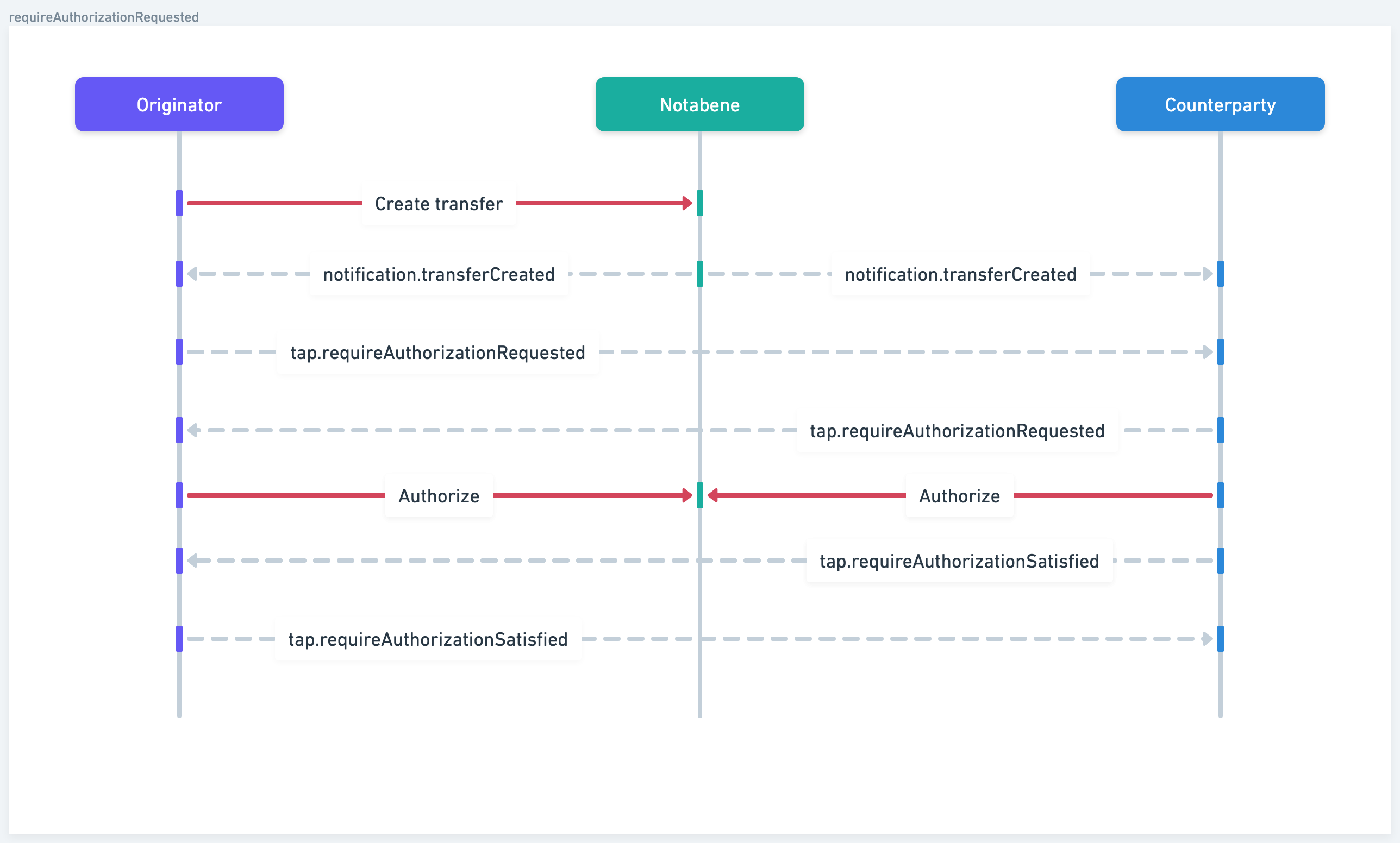
| tap.requireAuthorizationRequested | Every counterparty needs to authorize before you continue |
| tap.requireAuthorizationSatisfied | Every counterparty has authorized |
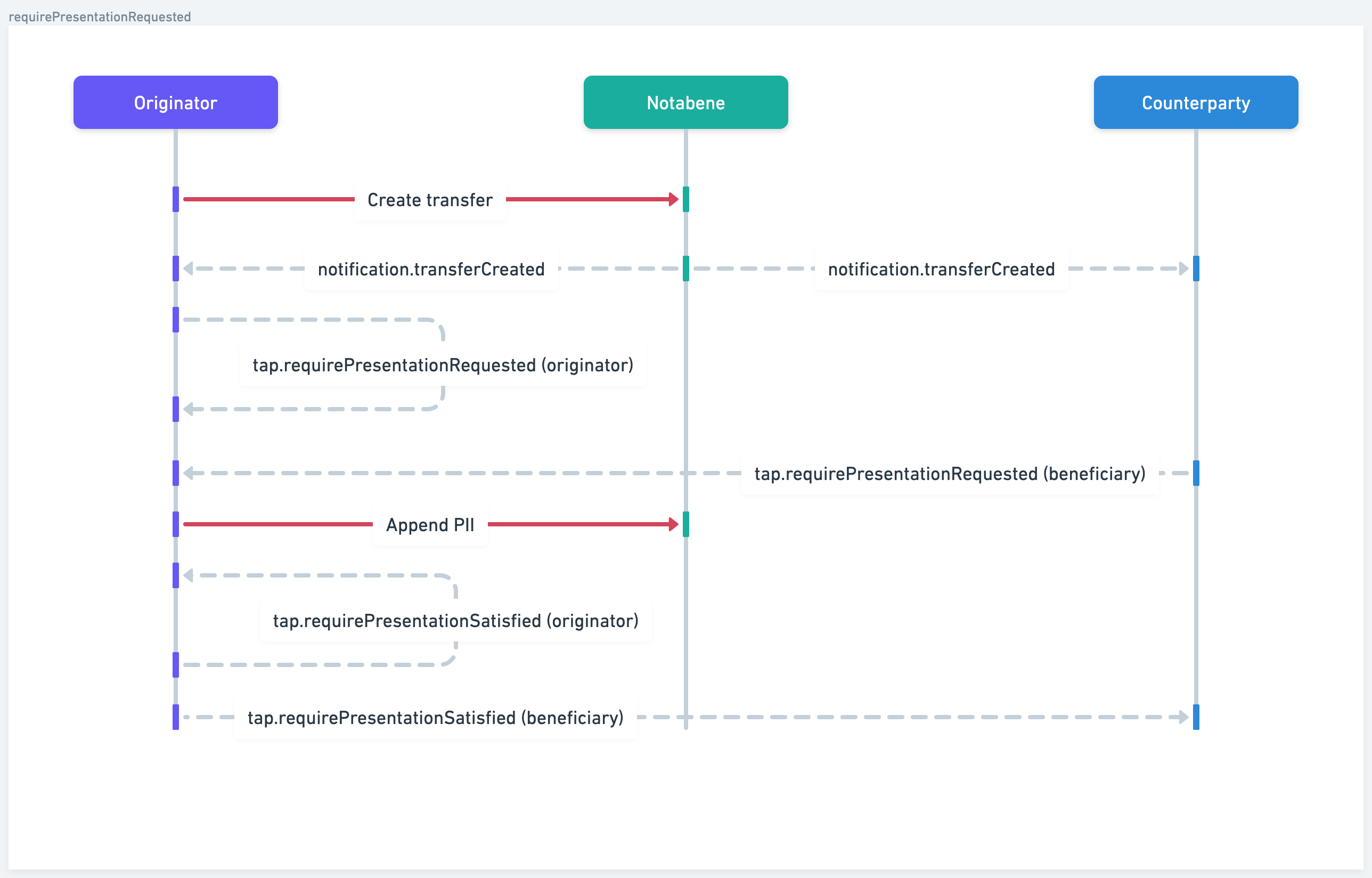
| tap.requirePresentationRequested | PII is requested |
| tap.requirePresentationSatisfied | PII has been provided |
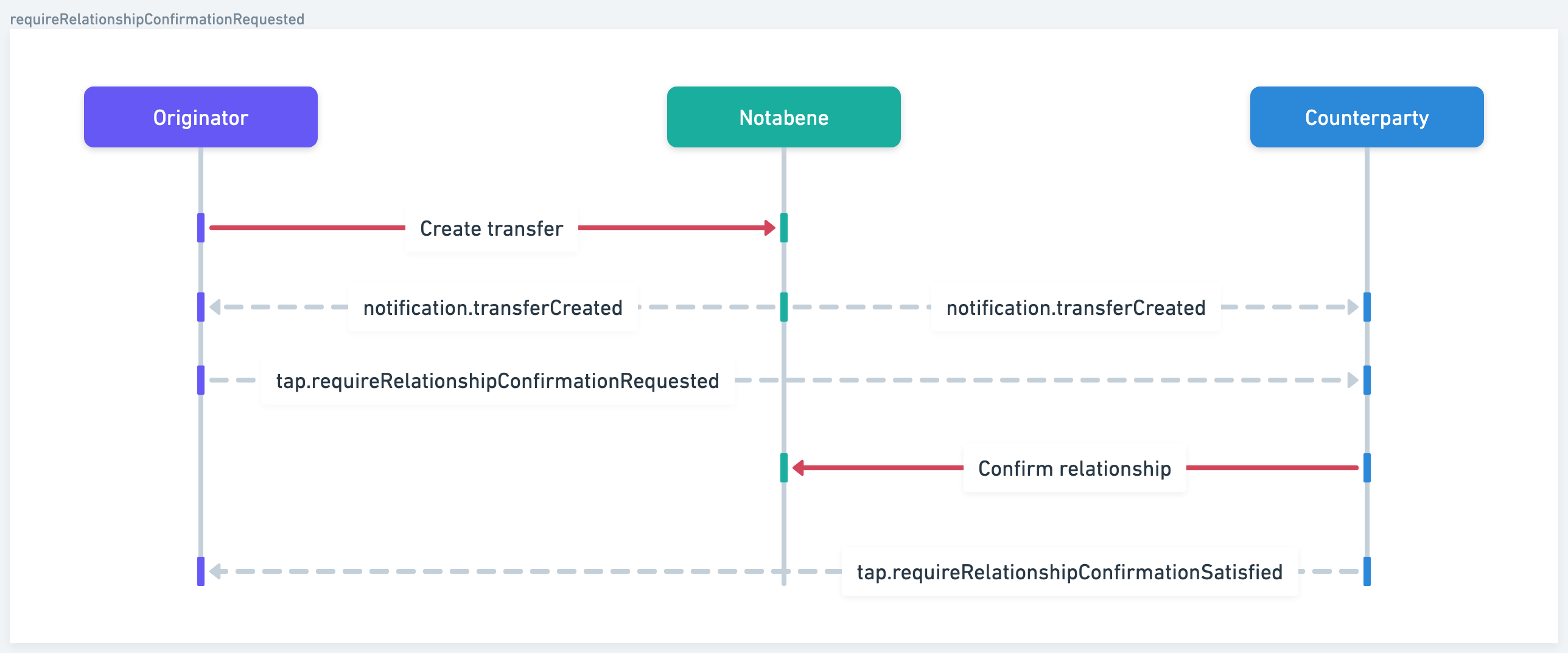
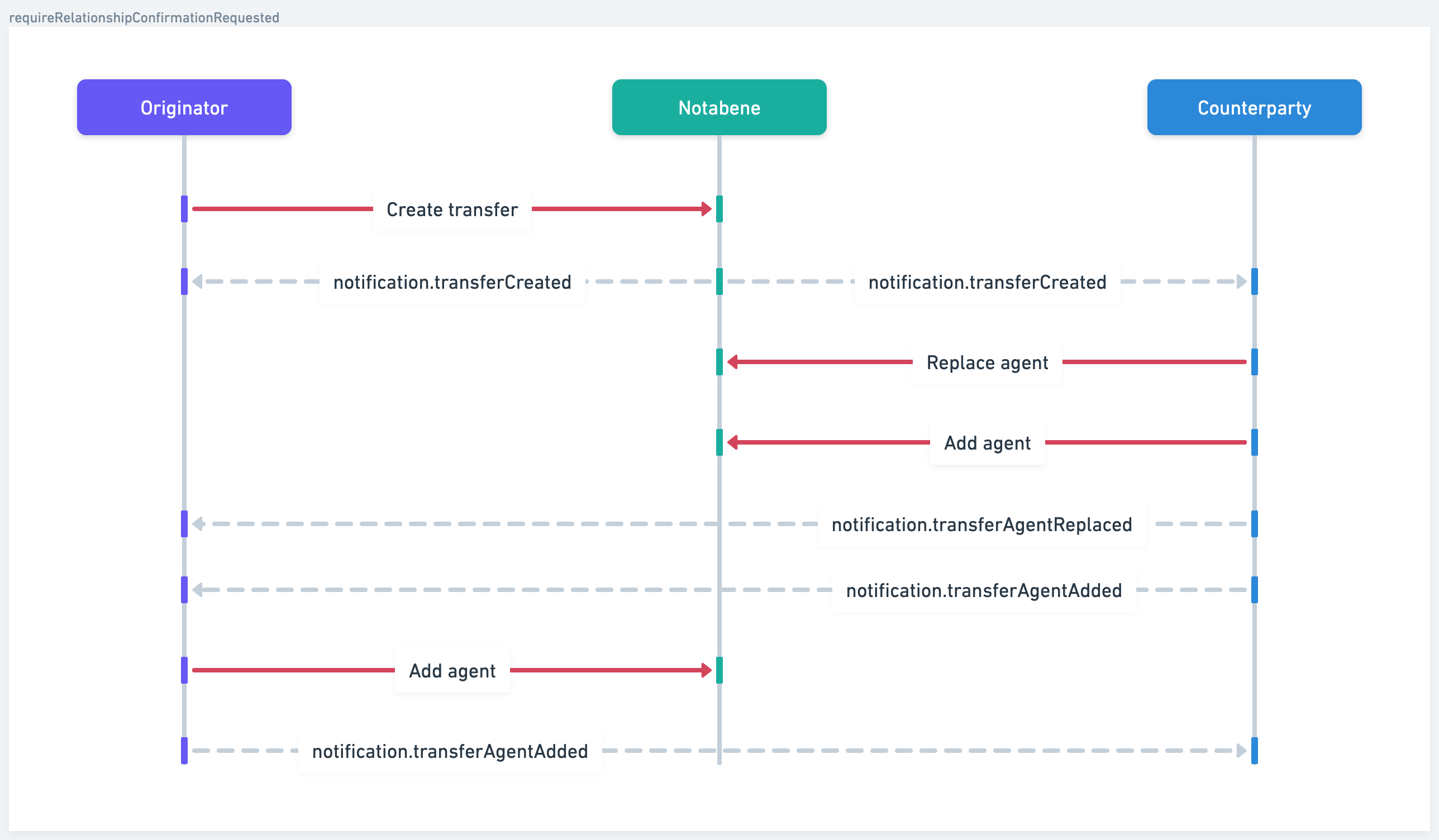
| tap.requireRelationshipConfirmationRequested | Address confirmation is needed |
| tap.requireRelationshipConfirmationSatisfied | Address has been confirmed |
Summary of webhooks
Depending on which policies and settings you and your counterparty have enabled, you might receive some or all of these webhook types.
When you createa message:
- notification.transferCreated - message has been created
- tap.requirePresentationRequested (from yourself) - you require yourself to provide PII for the transfer
- tap.requireAuthorizationRequested (from yourself) - you require that you authorise
- tap.requirePresentationRequested (from the beneficiary VASP) - they require you to provide PII data for the transfer
- tap.requireAuthorizationRequested (from the beneficiary VASP) - they want you to also authorize
When you recieve a message:
- notification.transferCreated - message has been created
- tap.requireAuthorizationRequested - they want you to authorise before they execute on the blockchain
- tap.requireRelationshipConfirmationRequested - they want you to confirm you control the address
When your counterparty performs actions:
- tap.requireRelationshipConfirmationSatisfied - when they have confirmed that they control the address
- notification.transferAgentStatusChanged - when they make a decision: authorise/reject/etc.
- notification.transferAgentReplaced - if they replace themselves with another agent
- tap.requireAuthorizationSatisfied - if you have authorised and completed their policy
- tap.requirePresentationSatisfied - when they add all the required PII information
When you perform an action:
- notification.transferAgentReplaced - if you replace yourself
- tap.requireAuthorizationSatisfied - if your counterparty has authorised and completed your policy
- tap.requirePresentationSatisfied - when you add all the required PII information
- notification.transferStatusChanged - if you change the status: authorise/reject/etc.
Sequence diagrams
requirePresentationRequested
requireRelationshipConfirmationRequested
requireAuthorizationRequested
transferAgentStatusChanged
transferAgentReplaced/Added
TAP webhooks
TAP webhooks notify your system when the counterparty VASP takes an action or when a Travel Rule step requires your attention.
They are not notifications about the underlying blockchain transfer itself — they are about the Travel Rule data exchange that must happen before a transfer can safely proceed.
These webhooks guide your system through every compliance step required in a Travel Rule interaction.
PII requested by yourself
If you are required to provide travel rule data for this message, you will get a tap.requirePresentationRequested webhook from yourself:
{
    "message": "tap.requirePresentationRequested",
    "payload": {
        "beneficiaryAgentID": "",
        "beneficiaryPresentationDefinition": "https://pd.notabene.id/ivms101/v2/DK-0.json",
        "callbackUrl": "/entities/did:web:notabene.id:test:dk/transfers/5dca34fa-3d67-469d-8981-0db1b80889a7/append",
        "for": "did:web:notabene.id:test:dk",
        "id": "5dca34fa-3d67-469d-8981-0db1b80889a7",
        "originatorAgentID": "did:web:notabene.id:test:dk",
        "originatorPresentationDefinition": ""
    },
    "version": "1.0.0"
}
originatorPresentationDefinition contains what your regulator requires you to send to the beneficiary VASP.
The following switch in your settings controls whether you get this webhook or not:

PII requested by your counterparty
In addition to the above, depending on the requirements set by the beneficiary, you might also get another tap.requirePresentationRequested message in return where they actively ask for PII from you:
{
    "message": "tap.requirePresentationRequested",
    "payload": {
        "beneficiaryAgentID": "did:web:notabene.id:test:no",
        "beneficiaryPresentationDefinition": "https://pd.notabene.id/ivms101/v2/NO-0.json",
        "callbackUrl": "/entities/did:web:notabene.id:test:dk/transfers/5dca34fa-3d67-469d-8981-0db1b80889a7/append",
        "for": "did:web:notabene.id:test:dk",
        "id": "5dca34fa-3d67-469d-8981-0db1b80889a7",
        "originatorAgentID": "did:web:notabene.id:test:dk",
        "originatorPresentationDefinition": "https://pd.notabene.id/ivms101/v2/DK-0.json",
        "policyId": "b7cffa7b-4cd0-4003-801e-92bda720f029"
    },
    "version": "1.0.0"
}
In the payload, these fields are of note:
beneficiaryAgentID this is the DID of beneficiary VASP.
beneficiaryPresentationDefinition this JSON contains the PII requirements they have and would like to recieve from you.
callbackUrlthis is where the PII should be attached to.
policyId if you are performing end-to-end encryption and want to target-deliver the PII using the txPresentation API, you might need this ID.
Difference in requirementsIf there are different presentation requirements between the originator VASP and beneficiary VASP, you are only required to provide what is required by your regulator.
However, to increase the likelihood of a positive response from the beneficiary, it is recommended that you provide everything required in both.

End-to-end PII encryption required

If your side hasn't enabled the Notabene managed encryption, the webhook will return the public key of the beneficiary VASP:
{
    "message": "tap.requirePresentationRequested",
    "payload": {
        "beneficiaryAgentID": "did:web:notabene.id:io",
        "beneficiaryPresentationDefinition": "https://pd.notabene.id/ivms101/v2/FA-1000.json",
        "callbackUrl": "/entities/did:web:notabene.id:test:dk/transfers/b0d9a75e-aa7d-4ec1-9b56-f4a3e1221185/policies/57214806-58f3-4246-b93e-2bad9b223d58/presentation",
        "encryptionKey": {
            "controller": "did:web:notabene.id:io",
            "id": "did:web:notabene.id:io#f7b6b6d3c8d55eadff413d9ef6d4a502c72d73273ede5fe5eff9fa393c52262b",
            "publicKeyBase58": "HfyJ6KTuDMHVfPiBoVhFHt1RsZvv8gYmJnSMGEZvkn5g",
            "type": "X25519KeyAgreementKey2019"
        },
        "for": "did:web:notabene.id:test:dk",
        "id": "b0d9a75e-aa7d-4ec1-9b56-f4a3e1221185",
        "originatorAgentID": "did:web:notabene.id:test:dk",
        "originatorPresentationDefinition": "https://pd.notabene.id/ivms101/v2/DK-0.json",
        "policyId": "57214806-58f3-4246-b93e-2bad9b223d58"
    },
    "version": "1.0.0"
}
You use this key to generate a shared key, then use that key to encrypt the data before submitting it using the txPresentation API.
PII provided
Once you have received the PII your requested, you will get the following webhook:
{
    "message": "tap.requirePresentationSatisfied",
    "payload": {
        "agentID": "did:web:notabene.id:test:no",
        "for": "did:web:notabene.id:test:no",
        "id": "b9fc8010-1ed3-4723-889d-de1d59f51444"
    },
    "version": "1.0.0"
}
PII partially provided
This means that you have not provided enough PII to satisfy your counterparty's presentation policy.
{
    "message": "tap.requirePresentationPartiallySatisfied",
    "payload": {
        "for": "did:web:notabeneid-6a3e4.sandbox.notabene.id:sg",
        "id": "52673c4d-fdd5-4cb6-b7aa-0b7b69936e6e",
        "policyId": "4c60495f-f8a7-47c3-a2d8-67076d75d3ee"
    },
    "version": "1.0.0"
}
If you get this, you should ideally investgate what PII is missing by looking at the requirements they sent you via a requirePresentationRequested message, it will be in the following field: beneficiaryPresentationDefinition:
https://pd.notabene.id/ivms101/v2/NO-0.json
Authorization requested
As the beneficiary, if you receive the below webhook it means that the originator VASP requires you to make a decision on the transfer before they will execute on the blockchain:
{
    "message": "tap.requireAuthorizationRequested",
    "payload": {
        "authorizeCallbackUrl": "/entity/did:web:notabene.id:test:dk/tx/4b440463-70a8-4fef-bcda-d1cf72bb6138/authorize",
        "beneficiaryAgentID": "did:web:notabene.id:test:no",
        "for": "did:web:notabene.id:test:dk",
        "id": "4b440463-70a8-4fef-bcda-d1cf72bb6138",
        "originatorAgentID": "did:web:notabene.id:test:dk",
        "purpose": null,
        "rejectCallbackUrl": "/entity/did:web:notabene.id:test:dk/tx/4b440463-70a8-4fef-bcda-d1cf72bb6138/reject"
    },
    "version": "1.0.0"
}
The decision can either be to authorize or to reject.
As the originator, you might receive a similar webhook from the beneficiary VASP.
Authorization recieved
If your counterparty has authorized the transfer, you will receive the following webhook:
{
    "message": "tap.requireAuthorizationSatisfied",
    "payload": {
        "agentID": "719ffb16-0323-4717-84c9-dd13dd063087",
        "for": "did:web:notabene.id:test:dk",
        "id": "b9fc8010-1ed3-4723-889d-de1d59f51444"
    },
    "version": "1.0.0"
}
If they reject, you will not get this webhook.
Address confirmation is requested
If you are the beneficiary VASP and the originator requires you to confirm that you control the wallet address, you will get this webhook:
{
    "message": "tap.requireRelationshipConfirmationRequested",
    "payload": {
        "beneficiaryAgentID": "did:web:notabene.id:test:no",
        "confirmCallbackUrl": "/entities/did:web:notabene.id:test:no/relationships?from=did:pkh:bip122:3tVgx5i1Ft6V8tyW2BXvEJGGSEs&to=did:web:notabene.id:test:no",
        "for": "did:web:notabene.id:test:no",
        "from": "did:pkh:bip122:3tVgx5i1Ft6V8tyW2BXvEJGGSEs",
        "id": "5dca34fa-3d67-469d-8981-0db1b80889a7",
        "originatorAgentID": "did:web:notabene.id:test:dk",
        "purpose": null
    },
    "version": "1.0.0"
}
The address they want you to confirm is in from.
If the address is yours, you can confirm this by calling the relationship API.
If the address is not yours, you can reject the transfer by calling the txReject API.
Address is confirmed
If address confirmation is required by you, when the beneficiary VASP has confirmed that they control the settlement address, you will recieve the following webhook message: tap.requireRelationshipConfirmationSatisfied
{
    "message": "tap.requireRelationshipConfirmationSatisfied",
    "payload": {
        "agentID": "did:pkh:bip122:3tVgx5i1Ft6V8tyW2BXvEJGGSEs",
        "for": "did:web:notabene.id:test:dk",
        "from": "did:pkh:bip122:3tVgx5i1Ft6V8tyW2BXvEJGGSEs",
        "id": "5dca34fa-3d67-469d-8981-0db1b80889a7",
        "relationshipId": "2de147dc-ebc6-41b5-afaa-148917c02f17",
        "status": "CONFIRMED",
        "to": "did:web:notabene.id:test:no"
    },
    "version": "1.0.0"
}
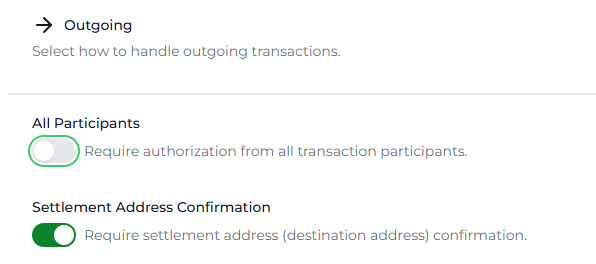
You can enable/disable this requirement by using the switch in your outgoing TAP policies: Settlement Address Confirmation
The beneficiary VASP receives this webhook, requesting them to confirm the address:
{
    "message": "tap.requireRelationshipConfirmationRequested",
    "payload": {
        "beneficiaryAgentID": "did:web:notabene.id:test:no",
        "confirmCallbackUrl": "/entity/did:web:notabene.id:test:no/relationship?from=did:pkh:bip122:000000000019d6689c085ae165831e93:32VjU7tDaQqEh1MrDbHkSpZBFdAGB&to=did:web:notabene.id:test:no",
        "for": "did:web:notabene.id:test:no",
        "id": "4894bd84-1506-49a4-87d5-69e891a506b7",
        "originatorAgentID": "did:web:notabene.id:test:dk",
        "purpose": null
    },
    "version": "1.0.0"
}
The address they need to confirm can be extracted from the callbackURL: 32VjU7tDaQqEh1MrDbHkSpZBFdAGB
Notification webhooks
Notification webhooks inform your system about events related to the lifecycle of a transfer, address validation, or general status updates that are not part of the TAP compliance conversation.
These events help you track operational and transactional progress in real time.
Creating the message
When you create an outgoing message, the first webhook payload you receive is the one below:
{
    "message": "notification.transferCreated",
    "payload": {
        "for": "did:web:notabene.id:test:dk",
        "id": "4b440463-70a8-4fef-bcda-d1cf72bb6138"
    },
    "version": "1.0.0"
}
Your counterparty will also receive the same.
Authorized by you
When you have completed all the steps you require and the message is authorized, you get the following webhook: notification.transferStatusChanged
{
    "message": "notification.transferStatusChanged",
    "payload": {
        "for": "did:web:notabene.id:fi",
        "fromStatus": "OUTGOING",
        "id": "6a52a28b-ced3-4c18-b229-159327050e0a",
        "toStatus": "AUTHORIZED"
    },
    "version": "1.0.0"
}
Authorized by your counterparty
When your counterparty authorises, you get this: notification.transferAgentStatusChanged
{
    "message": "notification.transferAgentStatusChanged",
    "payload": {
        "agentID": "did:web:notabene.id:test:no",
        "for": "did:web:notabene.id:test:dk",
        "fromStatus": "PROCESSING",
        "id": "b9fc8010-1ed3-4723-889d-de1d59f51444",
        "toStatus": "AUTHORIZED"
    },
    "version": "1.0.0"
}
Rejected by you
If you reject, you will receive the following webhook:
{
    "message": "notification.transferStatusChanged",
    "payload": {
        "for": "did:web:notabene.id:fi",
        "fromStatus": "OUTGOING",
        "id": "6a52a28b-ced3-4c18-b229-159327050e0a",
        "toStatus": "REJECTED"
    },
    "version": "1.0.0"
}
Rejected by your counterparty
If your counterparty rejects:
{
    "message": "notification.transferAgentStatusChanged",
    "payload": {
        "agentID": "did:web:notabene.id:test:no",
        "for": "did:web:notabene.id:test:dk",
        "fromStatus": "AUTHORIZED",
        "id": "b9fc8010-1ed3-4723-889d-de1d59f51444",
        "toStatus": "REJECTED"
    },
    "version": "1.0.0"
}
Settled by you
Once the transfer has been executed on the blockchain and you append the transaction hash using the txSettle API, you will receive the following webhook:
{
    "message": "notification.transferStatusChanged",
    "payload": {
        "for": "did:web:notabene.id:test:dk",
        "fromStatus": "OUTGOING",
        "id": "24c3f7e9-a4ad-441f-8792-fd58e9029fcf",
        "settlementId": "eip155:1:tx/ddf3a812-6a2a-4a94-a4a8-ec63e2358a7c",
        "toStatus": "SETTLED"
    },
    "version": "1.0.0"
}
Settled by your counterparty
If the transfer was settled by your counterparty, you get the below webhook:
{
    "message": "notification.transferAgentStatusChanged",
    "payload": {
        "agentID": "did:web:notabene.id:test:no",
        "for": "did:web:notabene.id:test:dk",
        "fromStatus": "AUTHORIZED",
        "id": "b9fc8010-1ed3-4723-889d-de1d59f51444",
        "toStatus": "SETTLED"
    },
    "version": "1.0.0"
}
Revert is requested by your counterparty
If your counterparty has initiated a reversal of a deposit they have recieved from you, you will get the following webhook:
{
    "message": "notification.transferStatusChanged",
    "payload": {
        "for": "did:web:notabene.id:test:dk",
        "fromStatus": "SETTLED",
        "id": "54061bfa-7596-494c-980a-1d4ca814ad4a",
        "settlementId": "eip155:1:tx/6r65r65rt78t75e6",
        "toStatus": "REVERT-REQUESTED"
    },
    "version": "1.0.0"
}
Agent(s) is added
This webhook is triggered when a new agent is discovered and added to a transfer, or added manually:
{
    "message": "notification.transferAgentAdded",
    "payload": {
        "agent": {
            "for": "did:web:notabene.id:test:dk",
            "id": "did:web:notabene.id:test:ck",
            "role": "Custodian"
        },
        "agentID": "did:web:notabene.id:test:ck",
        "for": "did:web:notabene.id:test:dk",
        "id": "5e1091d3-378b-4c3c-b806-7ae87c91fa31"
    },
    "version": "1.0.0"
}
Agents is replaced
This webhook will be triggered when an agent is replaced in a transfer (e.g., during redirection if it was sent to a gateway).
{
    "message": "notification.transferAgentReplaced",
    "payload": {
        "for": "did:web:notabene.id:test:dk",
        "fromAgentID": "did:web:notabene.id:test:no",
        "id": "24f53156-3515-4679-8373-97b90c9c3003",
        "toAgent": {},
        "toAgentID": "did:web:notabene.id:test:se"
    },
    "version": "1.0.0"
}
dd
Updated about 3 hours ago