
Verifying the beneficiary name / Internal checks
By default, the policies you set for incoming transfers will run and make a decision as soon as all required data is available. If you want to run beneficiary name matching or some other internal checks before this automated decision, you need to enable one or both of the transaction policies below:
- Beneficiary name matching
- Operational checks on provided PII/Travel Rule information
Beneficiary name matching
According to FATF, you should verify the accuracy of the beneficiary information you receive in the travel rule message:
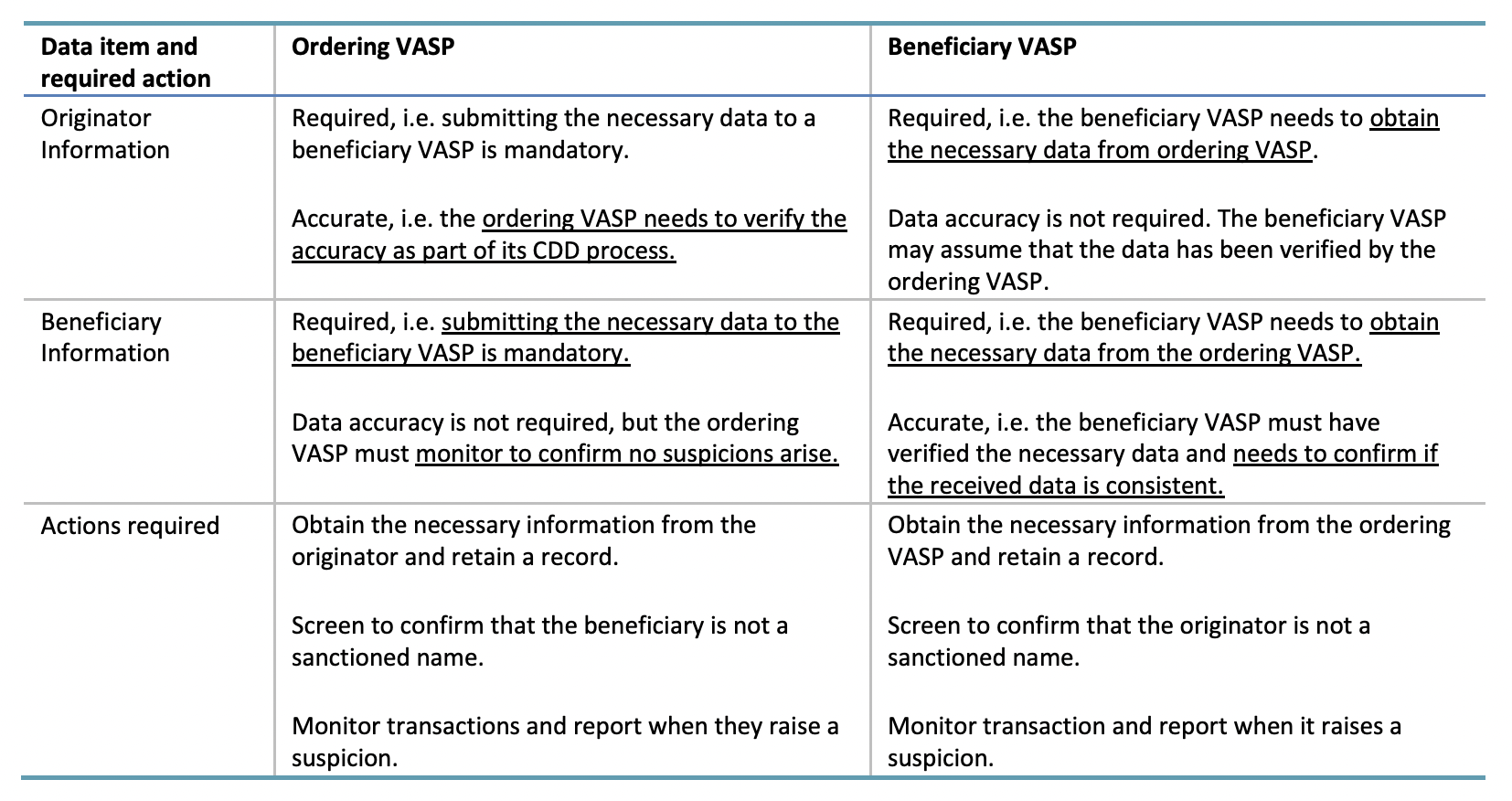
This means that in addition to verifying that the address belongs to you, you should also compare the beneficiary's name (and additional information, if applicable) in the travel rule message against the KYC details of your customer that you collected and confirmed during the onboarding stage.
Enabling beneficiary name matching
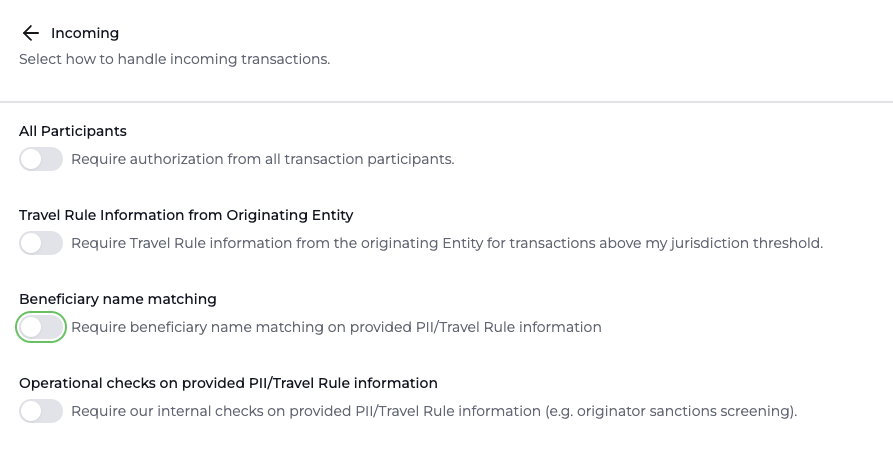
If you want to block any automated decision from happening until you have confirmed that the beneficiary name matches that of your customer, you need to enable the name matching policy in the Notabene UI:
Getting the beneficiary name
As you can see from the sequence of things in the diagram below, name matching cannot happen until you've actually recieved the PII.
So, after the originator VASP has sent the message and appended the PII, you need to confirm the address (if it has not already been confirmed in the past) before the PII is available to you:
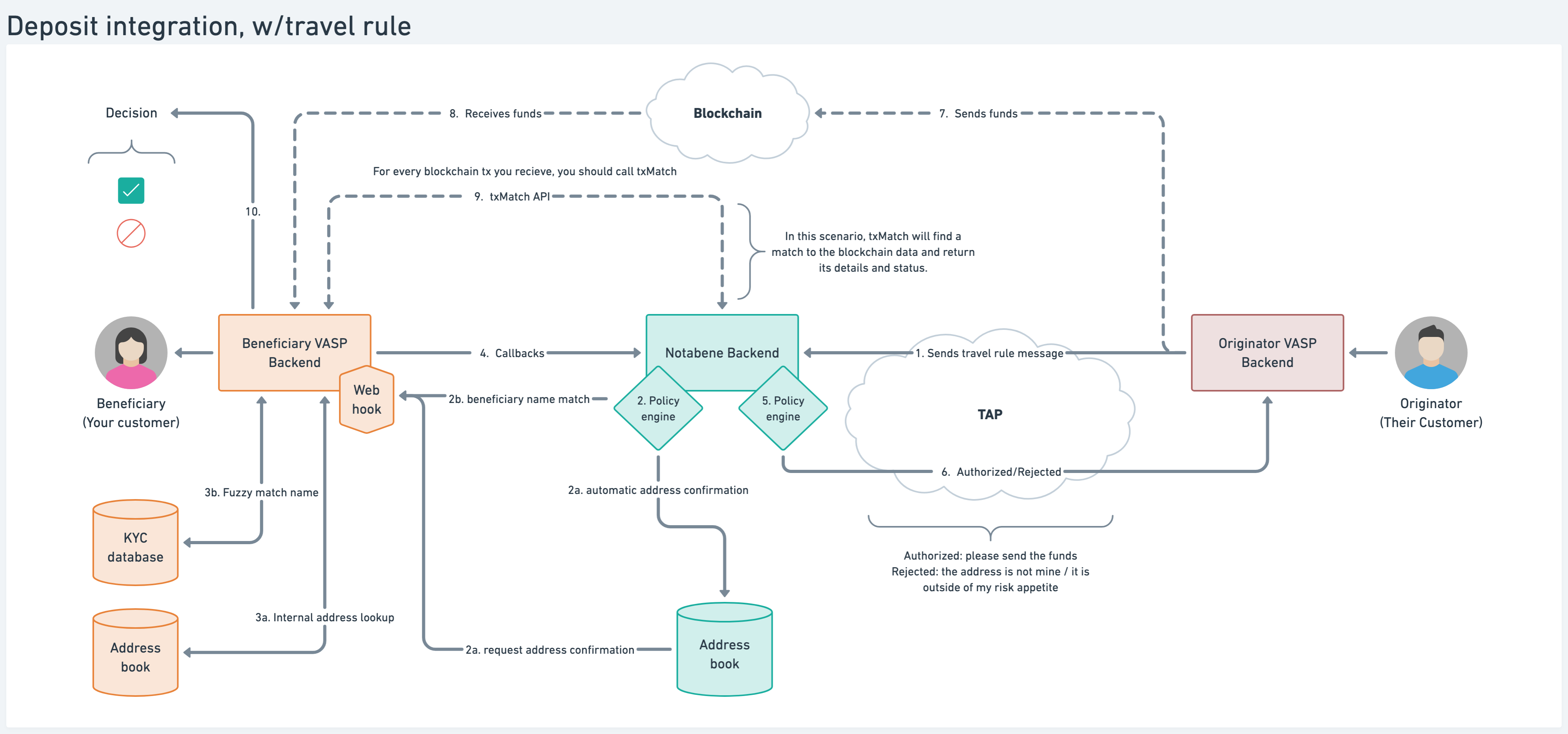
Once everything is done, address confirmed / PII appended, etc., you will know that the PII is available because you recieve the webhook message: requirePresentationSatisfied
When you recieve that webhook, you can call the Get Transfer API with the transfer ID from the requirePresentationSatisfied message (remember to enable decryption in the API call) to get all the PII data.
To do the beneficiary name matching, we are looking for the data inside beneficiary.beneficiaryPerson.naturalPerson.name.nameIdentifier as here you will find the first name and the last name of the beneficiary person, aka. your customer:
"beneficiary": {
            "@id": "did:web:notabene.id:users:christ",
            "accountNumber": "1GPgLg7sApKNqkpVGHePmPCdvCFiodvwN",
            "beneficiaryPerson": [
                {
                    "accountNumber": [
                        "1GPgLg7sApKNqkpVGHePmPCdvCFiodvwN"
                    ],
                    "naturalPerson": {
                        "name": {
                            "nameIdentifier": [
                                {
                                    "primaryIdentifier": "Heller",
                                    "secondaryIdentifier": "Emory",
                                    "naturalPersonNameIdentifierType": "LEGL"
                                }
                            ]
                        }
                    }
                }
            ]
        },
Performing the matching
Since you now have the beneficiary name from the travel rule message you have recieved, it is time to compare it with the customer's name in your KYC database.
There are many ways to compare two names against each other, one of them being fuzzy logic, which we will give an example of below.
Pretend that this is the record in your KYC database for that wallet address:
Notabene VASP SG Customer Database v1.234
Customer ID: 123456789
Wallet addr: 3uyZiAC2khxuxC26weZcrcEWubE8vEjY3
Name: Emory Heller
DoB: 01/01/1999
etc...
Because the name you receive in a travel rule message can be written in different ways, using fuzzy matching might be the best way to compare the information. Here is an example using fuzzywuzzy to perform the matching:
from fuzzywuzzy import fuzz

customerName = "Emory Way Heller"
primaryIdentifier = "Heller"
secondaryIdentifier = "Emory"
mergedIdentifier = primaryIdentifier+secondaryIdentifier
Ratio = fuzz.ratio(customerName.lower().replace(" ", ""),mergedIdentifier.lower().replace(" ", ""))
print(Ratio)

Ratio:88

#You can also use fuzz.token_sort_ratio to cater for mixed-up first and last name:
#In token sort ratio, the strings are tokenized and pre-processed by converting to lower case and getting rid of punctuation. The strings are then sorted alphabetically and joined together. Post this, the Levenshtein distance similarity ratio is calculated between the strings.
The ratio is "how similar are the two names", so you'd usually set a minimum ratio for when a name matches or not, keeping in mind that too high, you risk rejecting names with minor spelling mistakes. Too low, and there is no point in doing matching, as almost anything will pass.
A good starting point can be around 90-92, and then adjust from there as you evaluate the results.
Confirming the matching is complete
If the name matching was successful, you need to complete the policy that blocks automated decisions.
This is done by calling the following API:
POST https://api.eu1.notabene.id/entities/did:web:notabene.id:test:dk/tx/06b81e72-5c17-4534-b31d-327decf25c63/checks/beneficiary-name-matching'Rejecting if the matching fails
If the beneficiary name in the travel rule message doesn't match your KYC record, you should reject the transfer with a reason: BENEFICIARY_NOT_FOUND
Operational checks / Internal sanctions screening
Besides beneficiary name matching, your side might be using a sanctions screening provider that is not available in the Notabene marketplace. If this is the case and you want to perform these screenings before an automated decision is made by the policy engine, enable the "Operational checks on provided PII/Travel Rule information" option in the transaction policies.
Similar to the name matching policy above, if this is enabled, you will need to complete it by calling the below API, if your internal sanctions screening passes successfully:
POST https://api.eu1.notabene.id/entities/did:web:notabene.id:test:dk/tx/06b81e72-5c17-4534-b31d-327decf25c63/checks/internal-checks'If your internal checks fail, you call the txReject API with the appropriate reason.
Updated about 3 hours ago