
PII requirements
Learn about PII requirements for Travel Rule compliance, including jurisdictional guidelines and validation processes.
To effectively collect Travel Rule data, Notabene provides tools to navigate jurisdictional requirements, which can vary significantly. While your primary obligation is compliance within your jurisdiction, considering your counterparty's requirements can enhance processing efficiency.
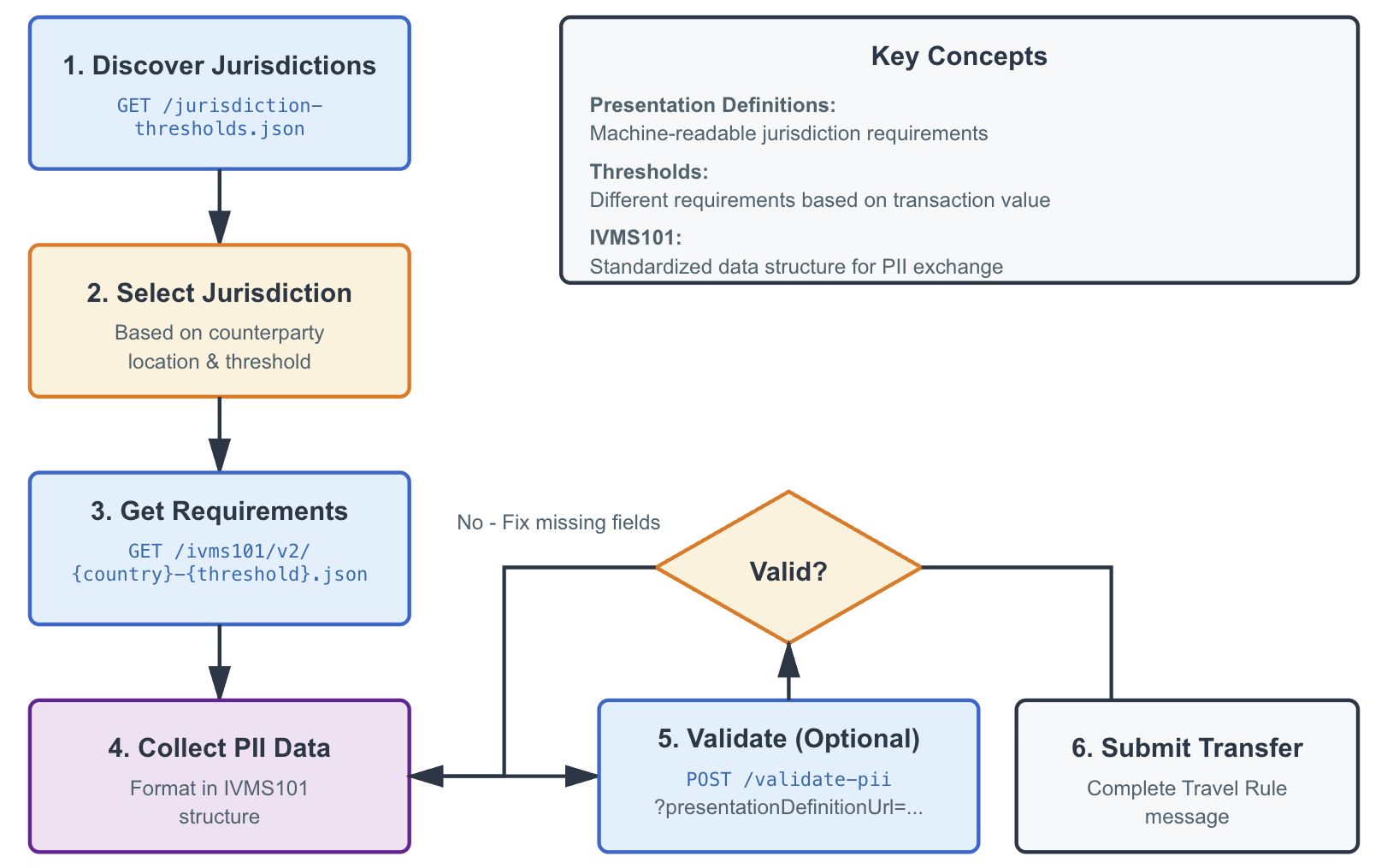
Presentation Definitions
Notabene uses 'Presentation Definitions' to specify jurisdictional requirements. These definitions are available at public URLs, such as:
https://pd.notabene.id/ivms101/v2/SG-0.json and https://pd.notabene.id/ivms101/v2/SG-1500.json
For jurisdictions without specific legislation, FATF guidelines are used. In the EU, all countries follow the TFR.
Jurisdiction list
To view jurisdictions with Travel Rule requirements, use:
GET https://pd.notabene.id/ivms101/v2/jurisdiction-thresholds.json
Refer to the Postman collection for more details.
{
        "thresholds": [
            {
                "presentationDefinitionURL": "https://pd.notabene.id/ivms101/v2/SG-1500.json",
                "threshold": "1500"
            },
            {
                "presentationDefinitionURL": "https://pd.notabene.id/ivms101/v2/SG-0.json",
                "threshold": "0"
            }
        ],
        "countryCode": "SG",
        "currency": "SGD",
        "jurisdictionStatus": "inForce",
        "jurisdictionNotabenePage": "https://notabene.id/world/singapore"
    }
Jurisdiction Requirements
Access presentation definitions for specific jurisdictions at URLs like SG-1500.json. These JSON files outline required IVMS groups and fields, offering choices where applicable (e.g., Originator address OR date of birth).
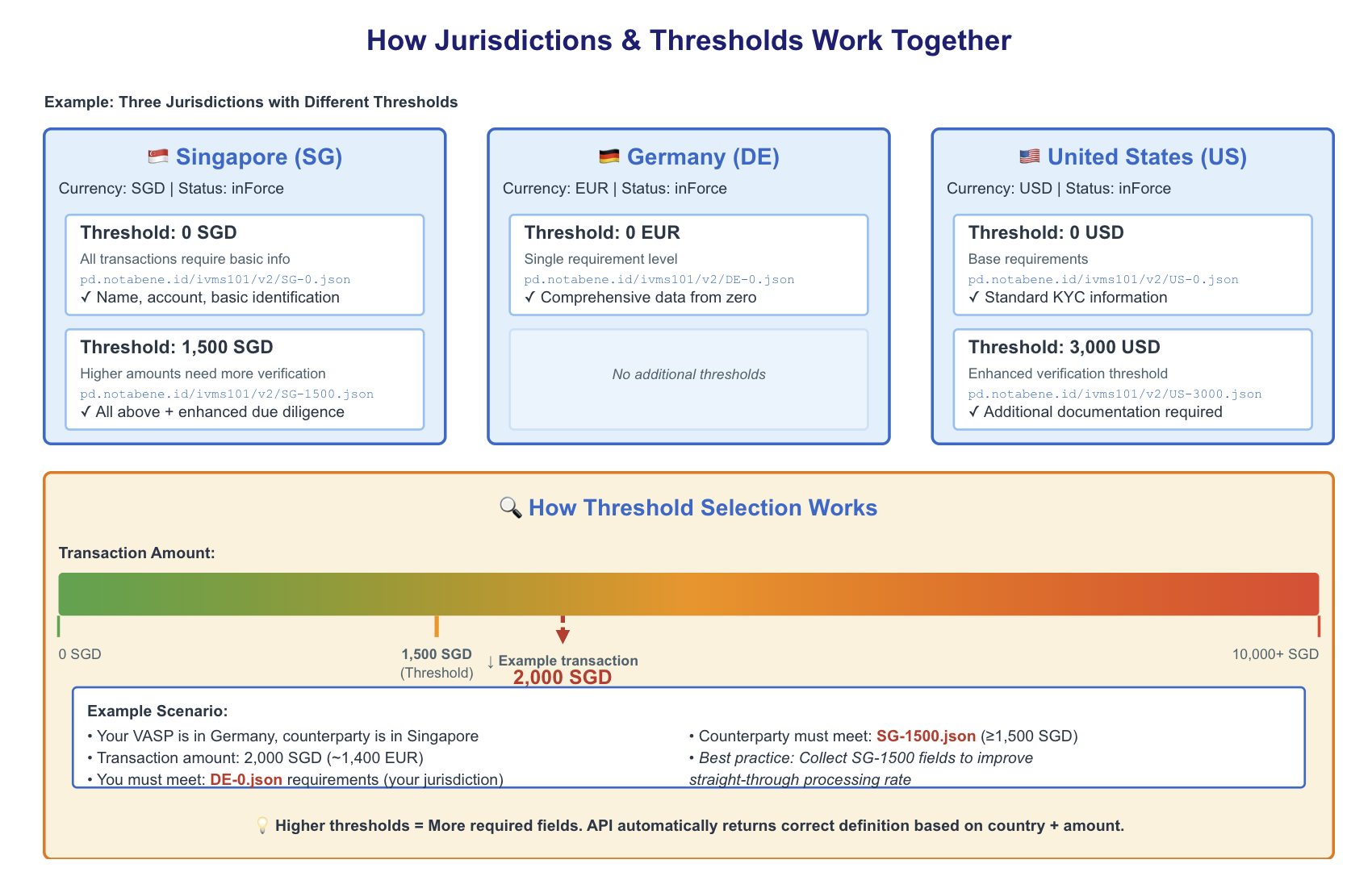
Helper Function:
Use the helper function in Postman to make these requirements more readable.
Validate PII Payload
Validate your IVMS-formatted PII against requirements using the validate-pii API. Include the presentationDefinitionUrl as a query parameter and post your IVMS data. The API response will indicate validity and highlight any missing fields.
Example response:
{
    "isValid": false,
    "errors": [
        "Missing required fields for the definition https://pd.notabene.id/ivms101/v2/DE-0.json"
    ],
    "missingFields": [
        "$.originator.originatorPerson[0].naturalPerson.name.nameIdentifier[0].primaryIdentifier"
    ],
    "validPaths": [
        "$.originator.originatorPerson[0].naturalPerson.name.nameIdentifier[0].secondaryIdentifier",
        "$.originator.originatorPerson[0].naturalPerson.name.nameIdentifier[0].naturalPersonNameIdentifierType",
        "$.originator.originatorPerson[0].accountNumber[0]",
        "$.beneficiary.beneficiaryPerson[0].naturalPerson.name.nameIdentifier[0].primaryIdentifier",
        "$.beneficiary.beneficiaryPerson[0].naturalPerson.name.nameIdentifier[0].secondaryIdentifier",
        "$.beneficiary.beneficiaryPerson[0].naturalPerson.name.nameIdentifier[0].naturalPersonNameIdentifierType",
        "$.beneficiary.beneficiaryPerson[0].accountNumber[0]",
        "$.originator.originatorPerson[0].naturalPerson.dateAndPlaceOfBirth.dateOfBirth",
        "$.originator.originatorPerson[0].naturalPerson.dateAndPlaceOfBirth.placeOfBirth",
        "$.originator.originatorPerson[0].naturalPerson.customerIdentification"
    ]
}
For a successful validation, a 200 OK message is returned:
{
    "isValid": true,
    "errors": [],
    "missingFields": [],
    "validPaths": [
        "$.originator.originatorPerson[0].naturalPerson.name.nameIdentifier[0].primaryIdentifier",
        "$.originator.originatorPerson[0].naturalPerson.name.nameIdentifier[0].secondaryIdentifier",
        "$.originator.originatorPerson[0].naturalPerson.name.nameIdentifier[0].naturalPersonNameIdentifierType",
        "$.originator.originatorPerson[0].accountNumber[0]",
        "$.beneficiary.beneficiaryPerson[0].naturalPerson.name.nameIdentifier[0].primaryIdentifier",
        "$.beneficiary.beneficiaryPerson[0].naturalPerson.name.nameIdentifier[0].secondaryIdentifier",
        "$.beneficiary.beneficiaryPerson[0].naturalPerson.name.nameIdentifier[0].naturalPersonNameIdentifierType",
        "$.beneficiary.beneficiaryPerson[0].accountNumber[0]",
        "$.originator.originatorPerson[0].naturalPerson.dateAndPlaceOfBirth.dateOfBirth",
        "$.originator.originatorPerson[0].naturalPerson.dateAndPlaceOfBirth.placeOfBirth",
        "$.originator.originatorPerson[0].naturalPerson.customerIdentification"
    ]
}
In case you did not provide any payload with IVMS the API returns a 400 bad request error like:
{
    "errors": {
        "body": [
            {
                "message": "ivms101 is a required field",
                "propertyPath": "ivms101"
            }
        ]
    }
}
IVMS101 cheat sheet
For a comprehensive list of IVMS101 fields and properties, refer to the cheat sheet.
Updated about 3 hours ago