
Receive Travel Rule (PII) data transfers
Learn how to receive and process Travel Rule (PII) data transfers, including webhook subscriptions and data retrieval.
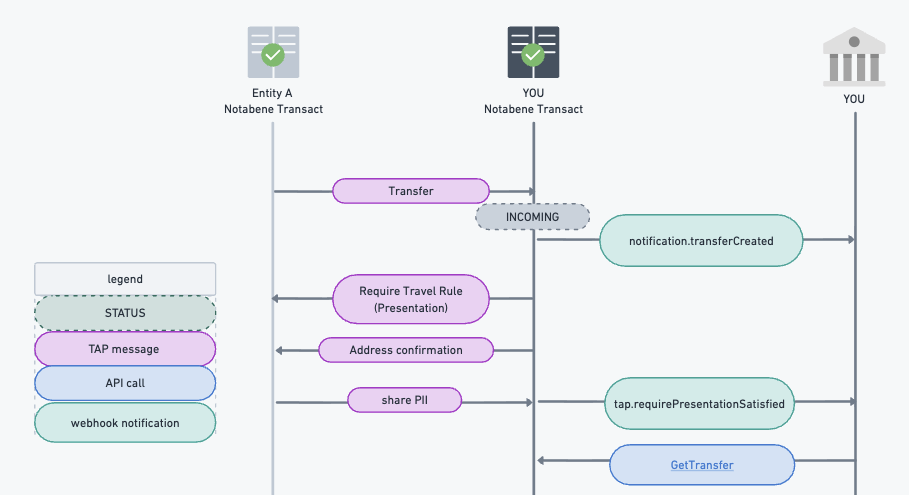
When you request it or when required by the Originator, you may receive Travel Rule messages. These messages are encrypted based on your DIDDoc settings.
Note: A counterparty will likely send a Travel Rule PII message only after you confirm their request for address ownership. Ensure timely responses and automate this process.
Steps to Receive Travel Rule Messages
- Subscribe to Webhook Events
Subscribe to thetap.requirePresentationSatisfiedevent to get notifications for incoming PII/Travel Rule messages. - Retrieve PII Data
Use the GET Transfer endpoint:{{url}}/entity/:entityDID/tx/:tx?decrypt=false.- If encrypted with your keys, you'll receive encrypted data.
- If encrypted by Notabene, set
decrypt=trueto request decrypted data.
- Check Received PII
- Completed Data: All required fields are present. The status is
COMPLETED, and a webhook is sent. Depending on your setup, you may need to authorize or reject. - Incomplete Data: Not all fields are present. The status is
INCOMPLETE. If updated, the platform re-evaluates and sends a new webhook if complete.
- Completed Data: All required fields are present. The status is
Visual Guide
Updated about 3 hours ago
What’s Next
Did this page help you?