
Automated testing/RoboVASPs
There are two categories of RoboVASPs:
a) those that perform simple actions like authorize, address confirmation, and reject
b) those that handle other scenarios like requesting PII from you, etc.
Simple actions
NotabeneBot - Authorize
If you send a message to did:web:notabene.id:br, it will always authorize:
{
  "originator": {
    "@id": "{{originatorID}}"
  },
  "beneficiary": {
    "@id": "{{beneficiaryID}}"
  },
  "asset": "{{BTC CAIP19}}",
  "amount": "{{$randomInt}}",
  "agents": [
    {
      "@id": "did:pkh:{{BTC CAIP2}}:{{$randomBitcoin}}",
      "for": "{{originatorVASPdid}}",
      "role": "SourceAddress"
    },
    {
      "@id": "{{originatorVASPdid}}",
      "for": "{{originatorID}}",
      "role": "VASP"
    },
    {
      "@id": "did:web:notabene.id:br", // Do not change
      "for": "{{beneficiaryID}}",
      "role": "VASP"
    },
    {
      "@id": "did:pkh:{{BTC CAIP2}}:{{$randomBitcoin}}",
      "for": "did:web:notabene.id:br", // Do not change
      "role": "SettlementAddress"
    }
  ],
  "ref": "{{$randomUUID}}"
}
NotabeneBot - Confirm
If you send a message to did:web:notabene.id:test:gb, it will always confirm that it controls the address.
Note: You need to enable the "Require settlement address confirmation" policy for this to happen.
{
  "originator": {
    "@id": "{{originatorID}}"
  },
  "beneficiary": {
    "@id": "{{beneficiaryID}}"
  },
  "asset": "{{BTC CAIP19}}",
  "amount": "{{$randomInt}}",
  "agents": [
    {
      "@id": "did:pkh:{{BTC CAIP2}}:{{$randomBitcoin}}",
      "for": "{{originatorVASPdid}}",
      "role": "SourceAddress"
    },
    {
      "@id": "{{originatorVASPdid}}",
      "for": "{{originatorID}}",
      "role": "VASP"
    },
    {
      "@id": "did:web:notabene.id:test:gb", // Do not change
      "for": "{{beneficiaryID}}",
      "role": "VASP"
    },
    {
      "@id": "did:pkh:{{BTC CAIP2}}:{{$randomBitcoin}}",
      "for": "did:web:notabene.id:test:gb", // Do not change
      "role": "SettlementAddress"
    }
  ],
  "ref": "{{$randomUUID}}"
}
NotabeneBot - Reject
If you send a message to did:web:notabene.id:test:bz, it will always be rejected:
{
  "originator": {
    "@id": "{{originatorID}}"
  },
  "beneficiary": {
    "@id": "{{beneficiaryID}}"
  },
  "asset": "{{BTC CAIP19}}",
  "amount": "{{$randomInt}}",
  "agents": [
    {
      "@id": "did:pkh:{{BTC CAIP2}}:{{$randomBitcoin}}",
      "for": "{{originatorVASPdid}}",
      "role": "SourceAddress"
    },
    {
      "@id": "{{originatorVASPdid}}",
      "for": "{{originatorID}}",
      "role": "VASP"
    },
    {
      "@id": "did:web:notabene.id:test:bz", // Do not change
      "for": "{{beneficiaryID}}",
      "role": "VASP"
    },
    {
      "@id": "did:pkh:{{BTC CAIP2}}:{{$randomBitcoin}}",
      "for": "did:web:notabene.id:test:bz", // Do not change
      "role": "SettlementAddress"
    }
  ],
  "ref": "{{$randomUUID}}"
}
NotabeneBot - Require PII
This entity will always request that you send them PII for any transfer.
- Send the payload:
{
  "originator": {
    "@id": "{{originatorID}}"
  },
  "beneficiary": {
    "@id": "{{beneficiaryID}}"
  },
  "asset": "{{BTC CAIP19}}",
  "amount": "{{$randomInt}}",
  "agents": [
    {
      "@id": "did:pkh:{{BTC CAIP2}}:{{$randomBitcoin}}",
      "for": "{{originatorVASPdid}}",
      "role": "SourceAddress"
    },
    {
      "@id": "{{originatorVASPdid}}",
      "for": "{{originatorID}}",
      "role": "VASP"
    },
    {
      "@id": "did:web:notabene.id:test:be", // Do not change
      "for": "{{beneficiaryID}}",
      "role": "VASP"
    },
    {
      "@id": "did:pkh:{{BTC CAIP2}}:{{$randomBitcoin}}",
      "for": "did:web:notabene.id:test:be", // Do not change
      "role": "SettlementAddress"
    }
  ],
  "ref": "{{$randomUUID}}"
}- Check your webhook
The robot will trigger a requirePresentationRequested message there, which means that they want you to provide PII according to what's required in their jurisdiction:
{
    "message": "tap.requirePresentationRequested",
    "payload": {
        "beneficiaryAgentID": "did:web:notabene.id:test:be",
        "beneficiaryPresentationDefinition": "https://pd.notabene.id/ivms101/v2/BE-0.json",
        "callbackUrl": "/entities/did:web:notabene.id:test:dk/transfers/7da9ff1b-f3fc-4a35-a8a2-e3e475d5a4a6/append",
        "for": "did:web:notabene.id:test:dk",
        "id": "7da9ff1b-f3fc-4a35-a8a2-e3e475d5a4a6",
        "originatorAgentID": "did:web:notabene.id:test:dk",
        "originatorPresentationDefinition": "https://pd.notabene.id/ivms101/v2/DK-0.json",
        "policyId": "8601a2a2-4e74-4b7b-970b-01ab61751995"
    },
    "version": "1.0.0"
}
To fulfill their requirement, you need to send the data in the beneficiary's presentation definition: https://pd.notabene.id/ivms101/v2/BE-0.json
Once you have all the PII data, you send it by calling txAppend.
NotabeneBot - Add custodian
This bot will add its custodian to the transfer.
{
  "originator": {
    "@id": "{{originatorID}}"
  },
  "beneficiary": {
    "@id": "{{beneficiaryID}}"
  },
  "asset": "{{BTC CAIP19}}",
  "amount": "{{$randomInt}}",
  "agents": [
    {
      "@id": "did:pkh:{{BTC CAIP2}}:{{$randomBitcoin}}",
      "for": "{{originatorVASPdid}}",
      "role": "SourceAddress"
    },
    {
      "@id": "{{originatorVASPdid}}",
      "for": "{{originatorID}}",
      "role": "VASP"
    },
    {
      "@id": "did:web:notabene.id:test:cf", // Do not change
      "for": "{{beneficiaryID}}",
      "role": "VASP"
    },
    {
      "@id": "did:pkh:{{BTC CAIP2}}:{{$randomBitcoin}}",
      "for": "did:web:notabene.id:test:cf", // Do not change
      "role": "SettlementAddress"
    }
  ],
  "ref": "{{$randomUUID}}"
}
NotabeneBot - Replace agent
This bot will replace itself with another VASP when you send it a message:
{
  "originator": {
    "@id": "{{originatorID}}"
  },
  "beneficiary": {
    "@id": "{{beneficiaryID}}"
  },
  "asset": "{{BTC CAIP19}}",
  "amount": "{{$randomInt}}",
  "agents": [
    {
      "@id": "did:pkh:{{BTC CAIP2}}:{{$randomBitcoin}}",
      "for": "{{originatorVASPdid}}",
      "role": "SourceAddress"
    },
    {
      "@id": "{{originatorVASPdid}}",
      "for": "{{originatorID}}",
      "role": "VASP"
    },
    {
      "@id": "did:web:notabene.id:ae", // Do not change
      "for": "{{beneficiaryID}}",
      "role": "VASP"
    },
    {
      "@id": "did:pkh:{{BTC CAIP2}}:{{$randomBitcoin}}",
      "for": "did:web:notabene.id:ae", // Do not change
      "role": "SettlementAddress"
    }
  ],
  "ref": "{{$randomUUID}}"
}
The original recipient:

The new recipient:

Data requests
If a blockchain deposit has been identified as lacking travel rule data, Notabene can help you request the missing data from the originator VASP. Below are two scenarios: you have received the deposit and requested data, and they have recieved a deposit and requested data from you.
NotabeneBot - They request missing PII from you (WIP)
This bot will pretend that it has recieved a deposit from you without the required travel rule data and will therefore make a data request, asking you to provide it.
- Trigger
{
  "originator": {
    "@id": "{{originatorID}}"
  },
  "beneficiary": {
    "@id": "{{beneficiaryID}}"
  },
  "asset": "{{BTC CAIP19}}",
  "amount": "{{$randomInt}}",
  "agents": [
    {
      "@id": "did:pkh:{{BTC CAIP2}}:{{$randomBitcoin}}",
      "for": "did:web:notabene.id:ht",// Do not change
      "role": "SourceAddress"
    },
    {
      "@id": "did:web:notabene.id:ht",// Do not change
      "for": "{{originatorID}}",
      "role": "VASP"
    },
    {
      "@id": "{{entityDID}}",
      "for": "{{beneficiaryID}}",
      "role": "VASP"
    },
    {
      "@id": "did:pkh:{{BTC CAIP2}}:{{$randomBitcoin}}",
      "for": "{{entityDID}}",
      "role": "SettlementAddress"
    }
  ],
  "ref": "{{$randomUUID}}"
}- Check your webhook
NotabeneBot - You request missing PII from them (WIP)
Similar to the above, except here you pretend that you recieved a blockchain deposit and didn't get any travel rule information from the originator VASP.
{
  "originator": {
    "@id": "{{originatorID}}"
  },
  "beneficiary": {
    "@id": "{{beneficiaryID}}"
  },
  "asset": "{{BTC CAIP19}}",
  "amount": "{{$randomInt}}",
  "settlementId": "{{$randomUUID}}",
  "agents": [
    {
      "@id": "did:pkh:{{BTC CAIP2}}:{{$randomBitcoin}}",
      "for": "{{originatorVASPdid}}",
      "role": "SettlementAddress"
    },
    {
      "@id": "{{originatorVASPdid}}",
      "for": "{{beneficiaryID}}",
      "role": "VASP"
    },
    {
      "@id": "did:web:notabeneid-f92bd.sandbox.notabene.id:dj", // Do not change
      "for": "{{originatorID}}",
      "role": "VASP"
    },
    {
      "@id": "did:pkh:{{BTC CAIP2}}:{{$randomBitcoin}}",
      "for": "did:web:notabeneid-f92bd.sandbox.notabene.id:dj", // Do not change
      "role": "SourceAddress"
    }
  ],
  "ref": "{{$randomUUID}}"
}
Once triggered, it will populate your data request with PII information.
NotabeneBot - Request encrypted PII from you
If you send a message to this bot, it will ask you to provide encrypted PII.
Note: You need to disable managed encryption for this to work.
- Send the payload:
{
  "originator": {
    "@id": "{{originatorID}}"
  },
  "beneficiary": {
    "@id": "{{beneficiaryID}}"
  },
  "asset": "{{BTC CAIP19}}",
  "amount": "{{$randomInt}}",
  "agents": [
    {
      "@id": "did:pkh:{{BTC CAIP2}}:{{$randomBitcoin}}",
      "for": "{{originatorVASPdid}}",
      "role": "SourceAddress"
    },
    {
      "@id": "{{originatorVASPdid}}",
      "for": "{{originatorID}}",
      "role": "VASP"
    },
    {
      "@id": "did:web:notabene.id:pf", // Do not change
      "for": "{{beneficiaryID}}",
      "role": "VASP"
    },
    {
      "@id": "did:pkh:{{BTC CAIP2}}:{{$randomBitcoin}}",
      "for": "did:web:notabene.id:pf", // Do not change
      "role": "SettlementAddress"
    }
  ],
  "ref": "{{$randomUUID}}"
}- You will recieve the following webhook:
{
    "message": "tap.requirePresentationRequested",
    "payload": {
        "beneficiaryAgentID": "did:web:notabene.id:pf",
        "beneficiaryPresentationDefinition": "https://pd.notabene.id/ivms101/v2/FA-1000.json",
        "callbackUrl": "/entities/did:web:notabene.id:test:dk/transfers/18bc0ce5-28dd-49a6-8974-837864b98674/policies/f4700b37-1bd2-4c60-8c50-8e7d16dc65ec/presentation",
        "encryptionKey": {
            "controller": "did:web:notabene.id:pf",
            "id": "did:web:notabene.id:pf#pii",
            "publicKeyJwk": {
                "crv": "P-256",
                "ext": true,
                "key_ops": [],
                "kty": "EC",
                "x": "LG-854XSJBq3gLdrA4K7K--FMdBPJ3oAHC60BHie3L0",
                "y": "oTyuuPKgLfC_A2bVUS1S74e3CWJuMppHH4T1ws8STbM"
            },
            "type": "EcdsaSecp256r1VerificationKey2019"
        },
        "for": "did:web:notabene.id:test:dk",
        "id": "18bc0ce5-28dd-49a6-8974-837864b98674",
        "originatorAgentID": "did:web:notabene.id:test:dk",
        "originatorPresentationDefinition": "https://pd.notabene.id/ivms101/v2/DK-0.json",
        "policyId": "f4700b37-1bd2-4c60-8c50-8e7d16dc65ec"
    },
    "version": "1.0.0"
}
Above, you can see everything you need to provide the PII end-to-end encrypted.
- Once your PII is encrypted with the correct keys, it needs to be sent by calling
txPresentation
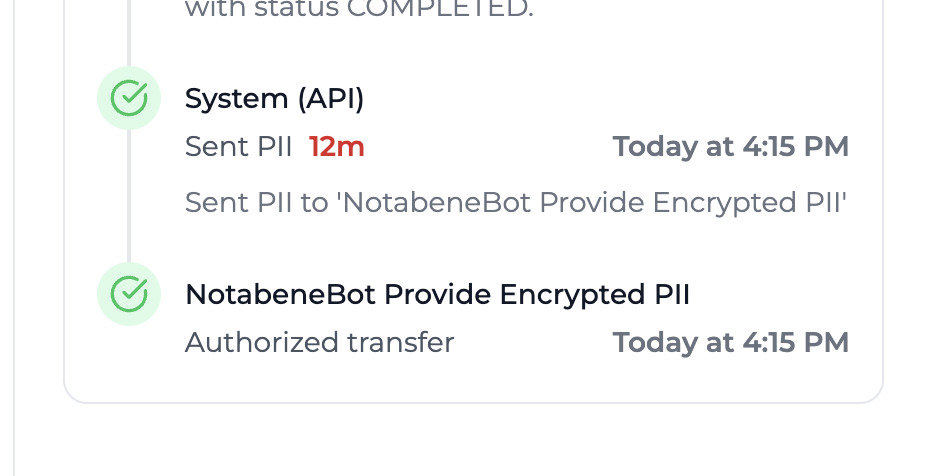
If the data you provided was successfully decrypted by the bot, it will authorize the transfer:
Updated 6 months ago