
Beneficiary-Initiated Request for Information
Overview
Transfers can be initiated by any entity in a transfer, especially by a beneficiary entity that received a deposit and wishes to collect travel rule data from you (the originator entity). When a Beneficiary initiates a Request for Information for an incoming transfer, the normal Travel Rule compliance flows apply with one key difference: the transfer's initial status is inverted.
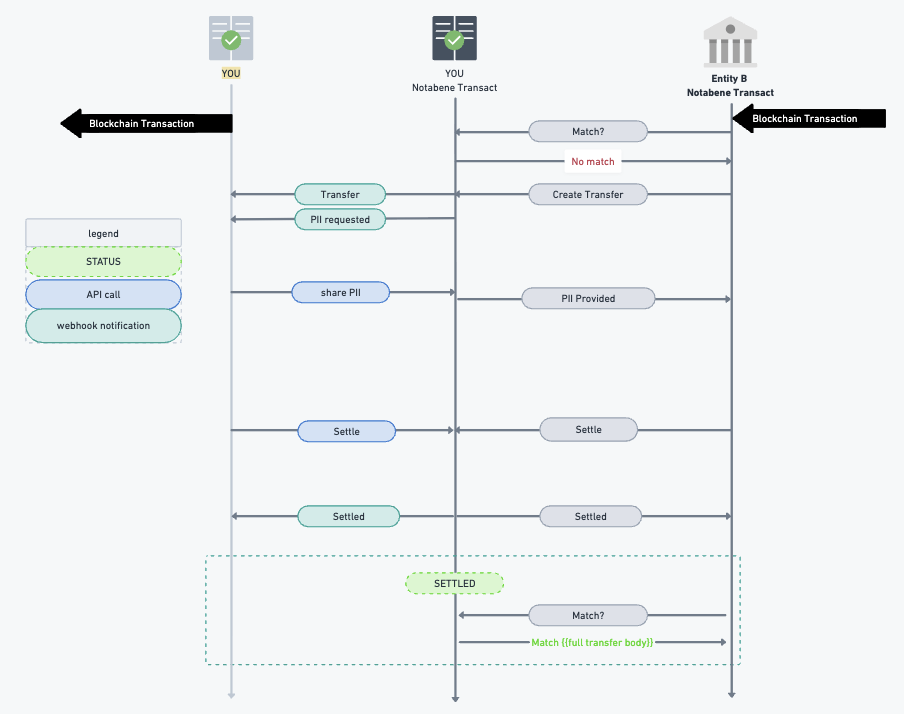
How It Works
Standard Flow vs. Beneficiary-Initiated Flow
Standard Originator-Initiated Flow:
Originator creates transfer → Initial status: Outgoing → ... → Settled
Beneficiary-Initiated Flow:
Beneficiary creates transfer → Initial status: Incoming (for outgoing direction) → ... → Settled
Key Characteristics:
- Direction vs. Status: The transfer direction represents the actual fund flow, while the status represents the state from your entity's perspective
- Automatic Settlement Confirmation: The initiating Beneficiary entity automatically confirms the settlement address
- Standard Policies Apply: All normal compliance policies and workflows apply regardless of who initiates
PII Requirements: These transfers require PII to be shared to reach completion
Handling Beneficiary-Initiated RFIs
Step 1: Identify the Transfer
When you receive a transfer with direction: OUTGOING and status: INCOMING:
 "transfer": {
        "@id": "...",
        "direction": "OUTGOING",
        "status": "INCOMING",
        "initiator": "BENEFICIARY-DID",
  			// ... other fields
				}
You will also receive the transfer created webhook.
Step 2: Map to Existing Transaction
Option A: Match to Known On-Chain Transaction
If you can map this RFI to an existing on-chain transaction:
- Retrieve the existing transaction details
- Respond to the PII request with the relevant originator/beneficiary information
- Progress the transfer through standard status transitions to SETTLED
Option B: Reject Unknown Transfers
If you cannot identify this transfer as one of yours:
- Reject the transfer with an appropriate reason code
- Document why the transfer was not recognized (e.g., "No matching transaction found")
Step 3: Provide PII Response
Once mapped to a transaction, respond to PII (requirePresentation) requests following your standard Travel Rule procedures.
Expected Volume
For entities that already create transfers and progress them through standard statuses to SETTLED, the volume of Beneficiary-initiated RFIs is expected to be low. These requests typically occur only when:
- A Beneficiary hasn't received expected Travel Rule information
- The beneficiary is mapping you wrongly as the Originator entity to a received onchain transaction
- You mapped a wrong beneficiary entity to an onchain settled transfer.
Updated 9 months ago