
TRUSThub connector (beta)
How to receive TR data from VASPs using TRUSThub
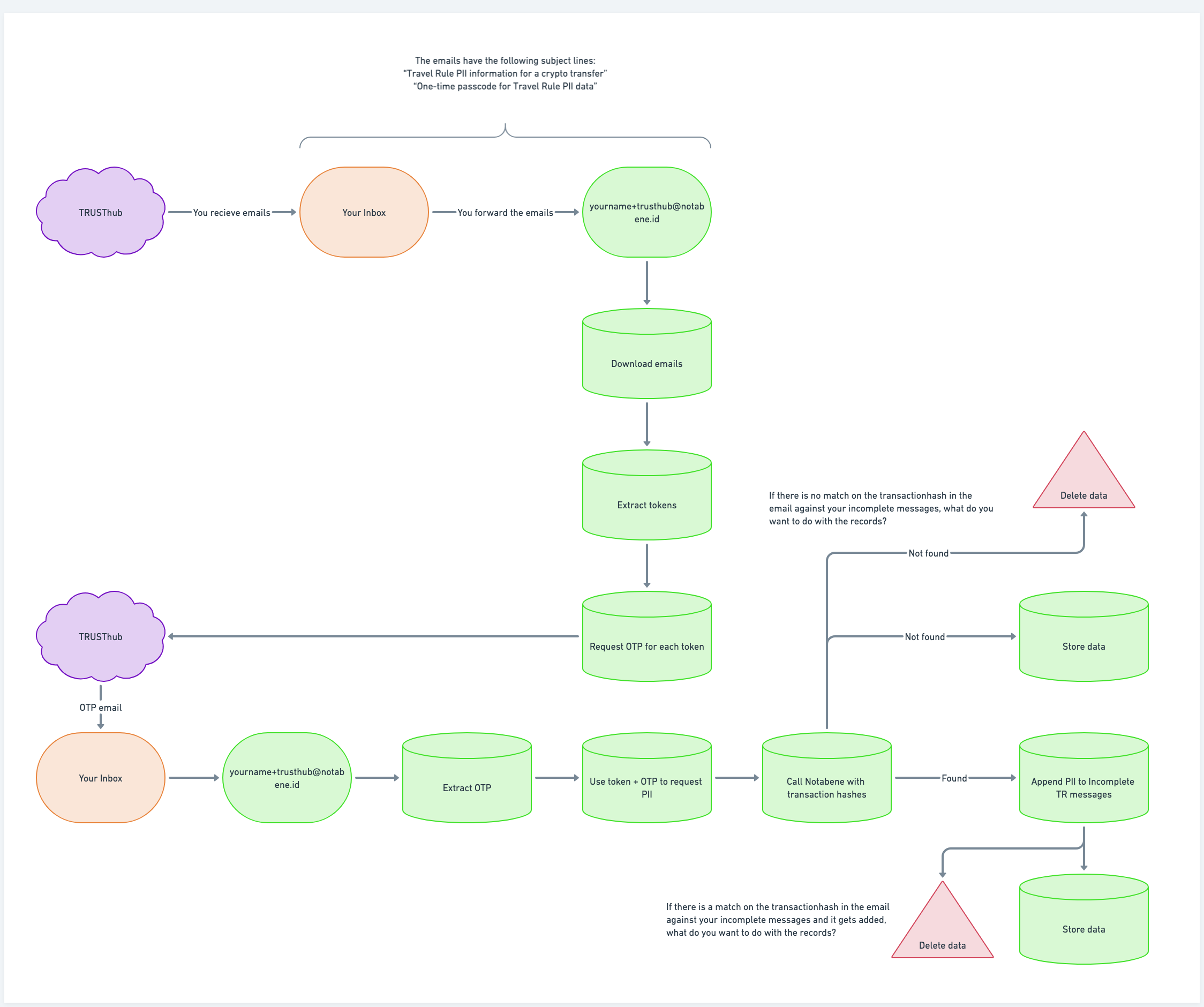
If you receive emails from other exchanges that leverage TRUSThub and do not want to work with this data manually, you can use Notabene's TRUSThub connector. This connector consumes these emails and attaches the travel rule data to your incomplete messages.
To enable this, the following is required:
- Currently receiving emails from one or more TRUSThub VASPs
- Inform your Notabene's customer success representative that you want to enable this connector
- Ensure you are calling txNotify for every blockchain deposit you are receiving
- Make a forward rule to [email protected] for emails that have these two subject lines:
- "Travel Rule PII information for a crypto transfer"
- "One-time passcode for Travel Rule PII data"
Note: the subject lines might vary from sender to sender, but they are usually something similar to the above.
The ingestion of the data will work as described in the diagram below:
Updated 8 days ago
Did this page help you?