For AI agents: the docs index is at https://devx.notabene.id/llms.txt. Append .md to any documentation page URL to get its markdown version.
Jump to Content
Notabene Travel Rule Integration
HomeGuidesRecipesAPI ReferenceReleases
GuidesReleasesPostmanRecipesAPI ReferenceNotabene Travel Rule Integration
Guides
GuidesReleasesPostmanRecipesAPI Reference
Diagrams

Transact v2

  • Rate limiting
  • Notabene IPs
  • Introduction
  • Creating your account
  • DIDdoc setup
    • DIDdocs explained
    • Key Management in DIDdocs
  • Authentication
  • Diagrams
  • 1. Initiating a Transfer
    • Create transfers
      • Data collection
      • Transfer payload structure
      • Asset, addresses and custom value
      • Create Outgoing transfers
    • Authorization requirements
    • Provide PII
      • PII requirements
      • Encryption managed by Notabene
      • Encryption managed by the Customer
    • Reject, Authorize and Settle
  • 2. Incoming transfers
    • Confirm address
    • Verifying the beneficiary name / Internal checks
    • Authorization requirements
    • Receive Travel Rule (PII) data transfers
    • Authorize, Reject or Flag
    • Settlement Process
    • Redirect transfers
    • Reconcile received transfers
    • Beneficiary-Initiated Request for Information
  • Statuses explained
  • Relationships
  • PII Encryption Guide
    • Encryption workflow
    • Decryption workflow
  • Webhooks
  • Webhook events details
  • Automated testing/RoboVASPs
  • Adding Agents to a transfer
  • Assets, Coins, and Tokens

SafeConnect Embedded Components

  • SafeConnect Components
    • Configuring the SafeConnect Components
    • Component Events
    • Embedded Components + V1 API
    • Embedded Components + V2 API
    • Self Hosted Wallet Proofs
    • FAQ

Transact V1

  • Sunsetting v1 of Notabene
    • Flow Diagrams (v1)
    • Travel Rule Statuses (v1)
    • 1. Authentication
      • Generate API credentials
      • Generate accessToken
      • Generate customerToken
    • 2. Front-end data collection
      • Validation API
    • 3. Creating travel rule messages
      • Payload validation (optional)
      • Using txCreate
      • Adding transaction hash/origin wallet
    • 4. Receiving travel rule messages
      • Upload CSV or register single address
      • Using notification webhook
      • Verify beneficiary details - name match
      • Dealing with duplicate hashes
    • 5. Checking blockchain deposits for travel rule
      • Using txNotify
      • Incomplete message - how to collect data?
      • Updating an incomplete message
    • 6. Webhooks
      • Trigger webhook
      • Notification webhook
    • Marketplace
      • Sanctions screening
        • Configuration
        • Diagrams
      • Blockchain Analytics
      • External screening
    • Testing/Errors
      • RoboVASPs
      • Error Messages
      • API Testing Script
    • Encryption
      • Encryption flows
      • Key management
    • SDKs
      • Node SDK
      • PII SDK
    • Identifying your counterparty
    • Nested VASPs
    • Coins & Decimals
      • Supported Assets
      • Unsupported Assets
    • Fireblocks Integration Overview
      • Sending and Receiving Travel Rule Messages - Fireblocks
      • Integrating Notabene Into Your Fireblocks Policies
      • Using Notabene, Fireblocks and Blockchain Analytics
      • Testing and FAQ
      • Diagrams
    • TRUSThub connector (beta)

Partner Integrations

  • Mastercard Crypto Credential
Powered by 

Diagrams

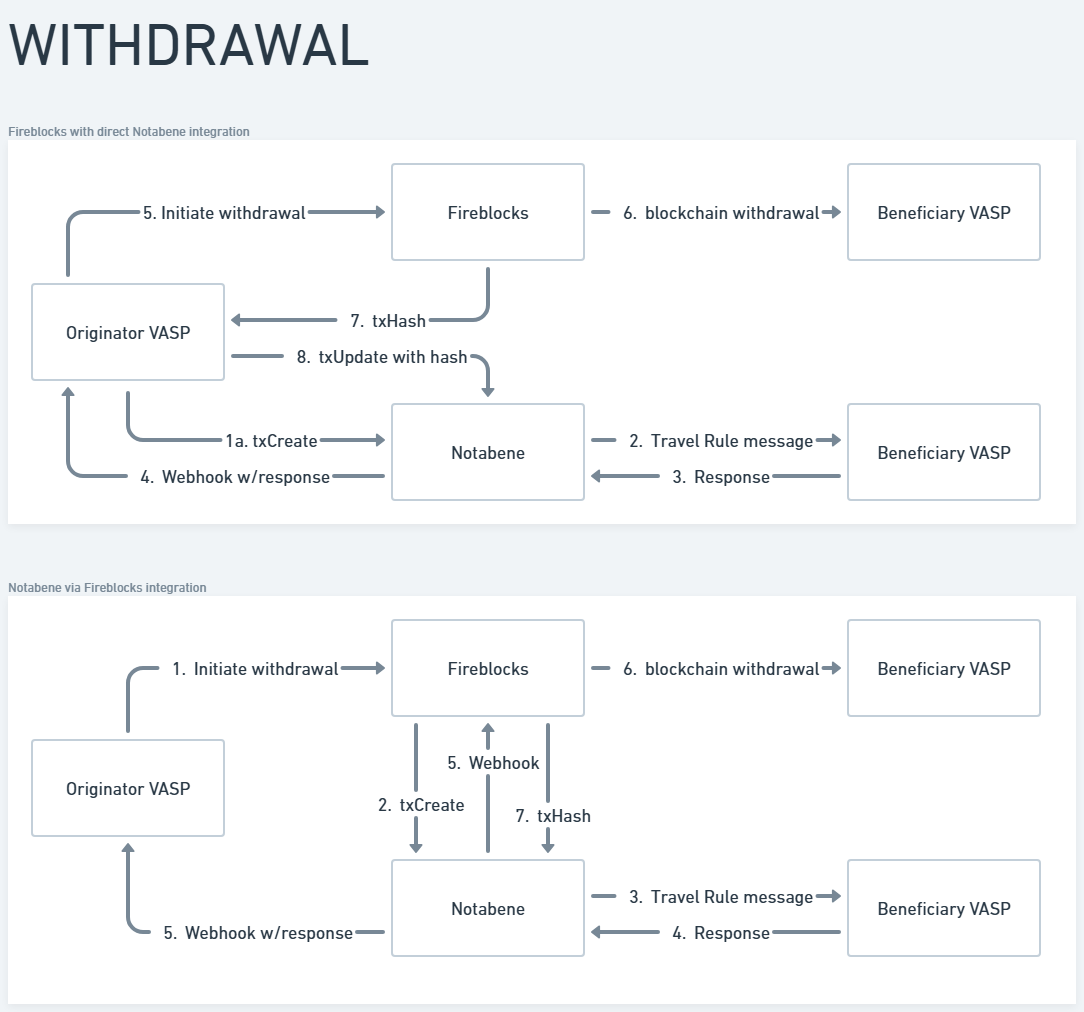
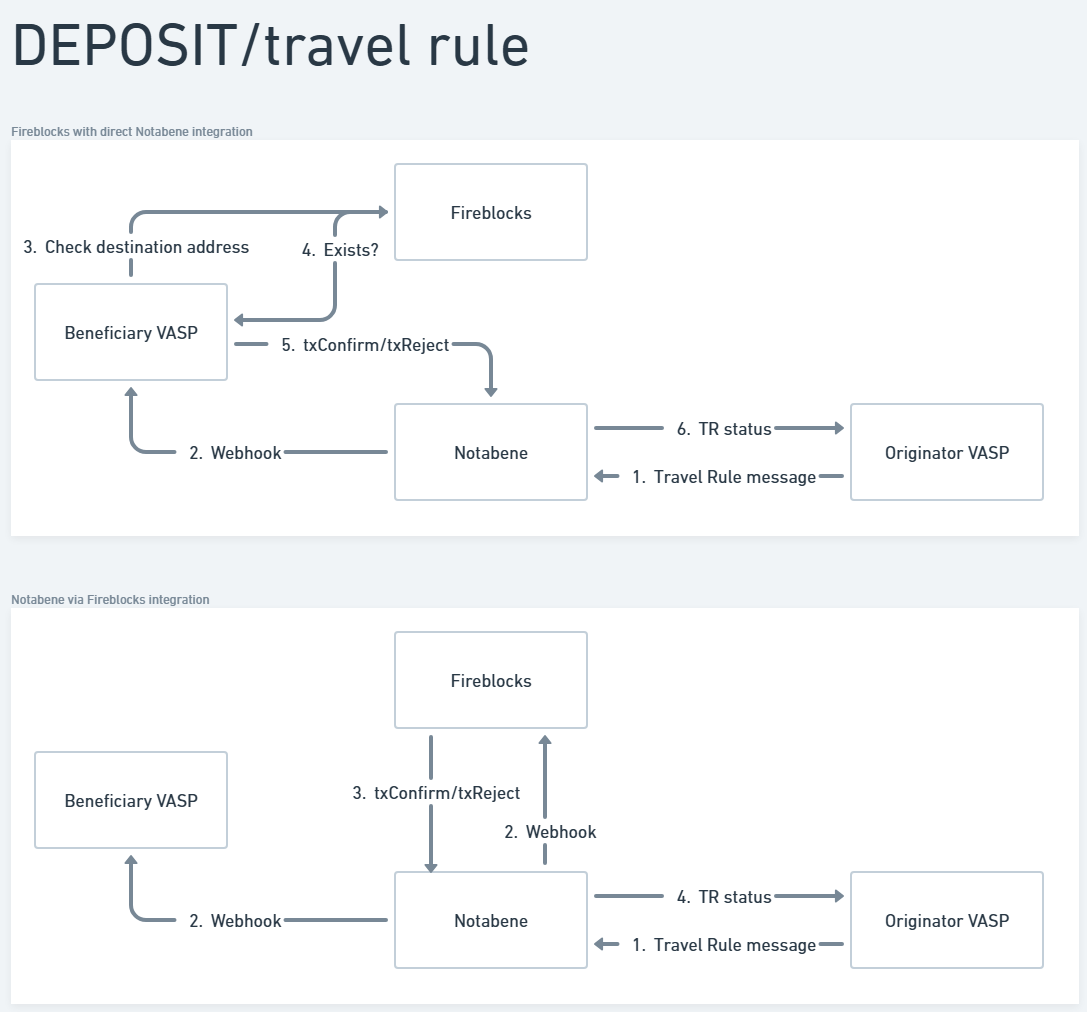
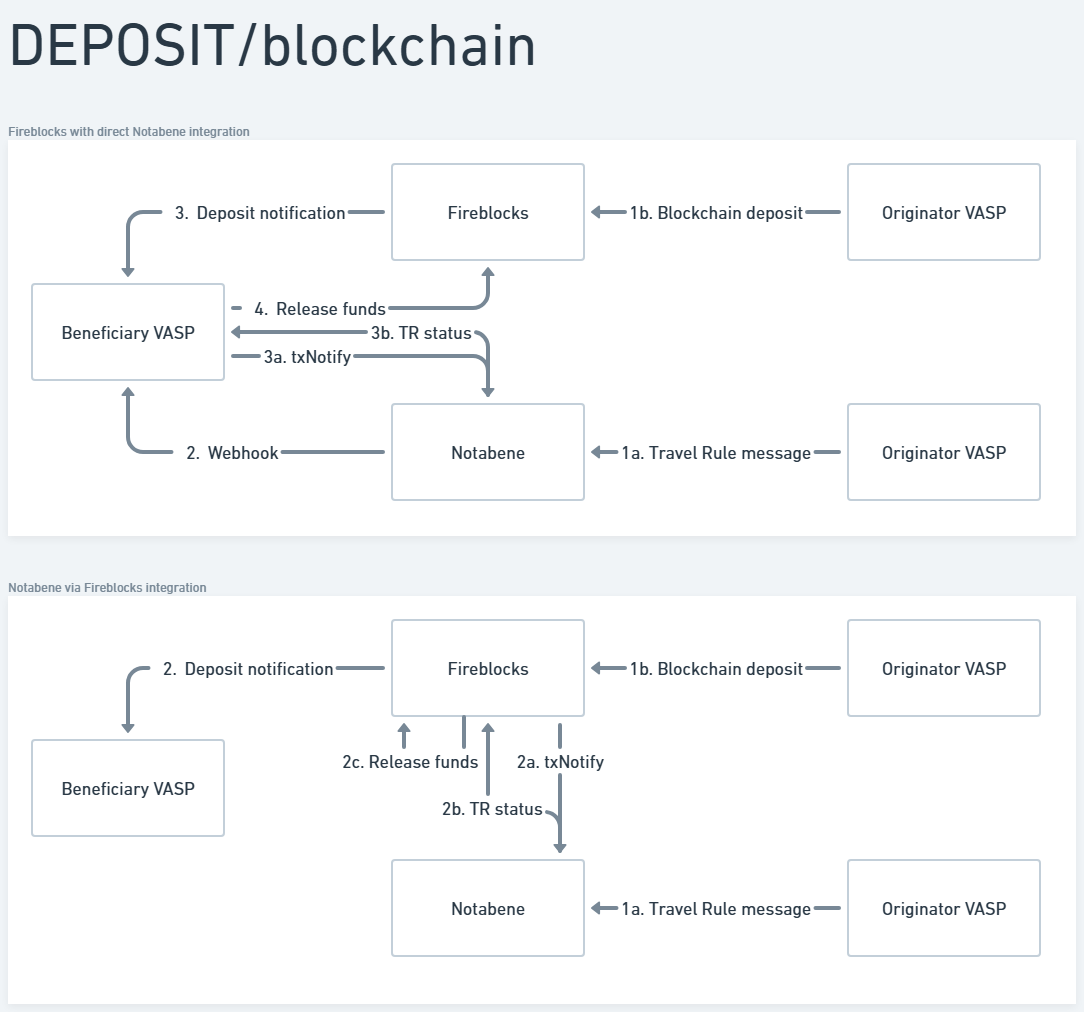
Here you will see a comparison between integrating separately with Notabene vs. through Fireblocks.

Withdrawal flow


Deposit - travel rule flow


Deposit - blockchain flow

Updated 8 days ago


Testing and FAQ
TRUSThub connector (beta)
Did this page help you?
    • Withdrawal flow
    • Deposit - travel rule flow
    • Deposit - blockchain flow